Skip to content
All shaders & texture packs

Colourful Ore UI - Bedrock Port

BedrockTexture packRealistic

by QuartzEnder

Rating
3.6 / 5
Downloads
66,232 downloads
Last update
Updated
Published on
Published on MCPEDL
Colourful Ore UI - Bedrock Port screenshot 1 of 12

About this texture pack

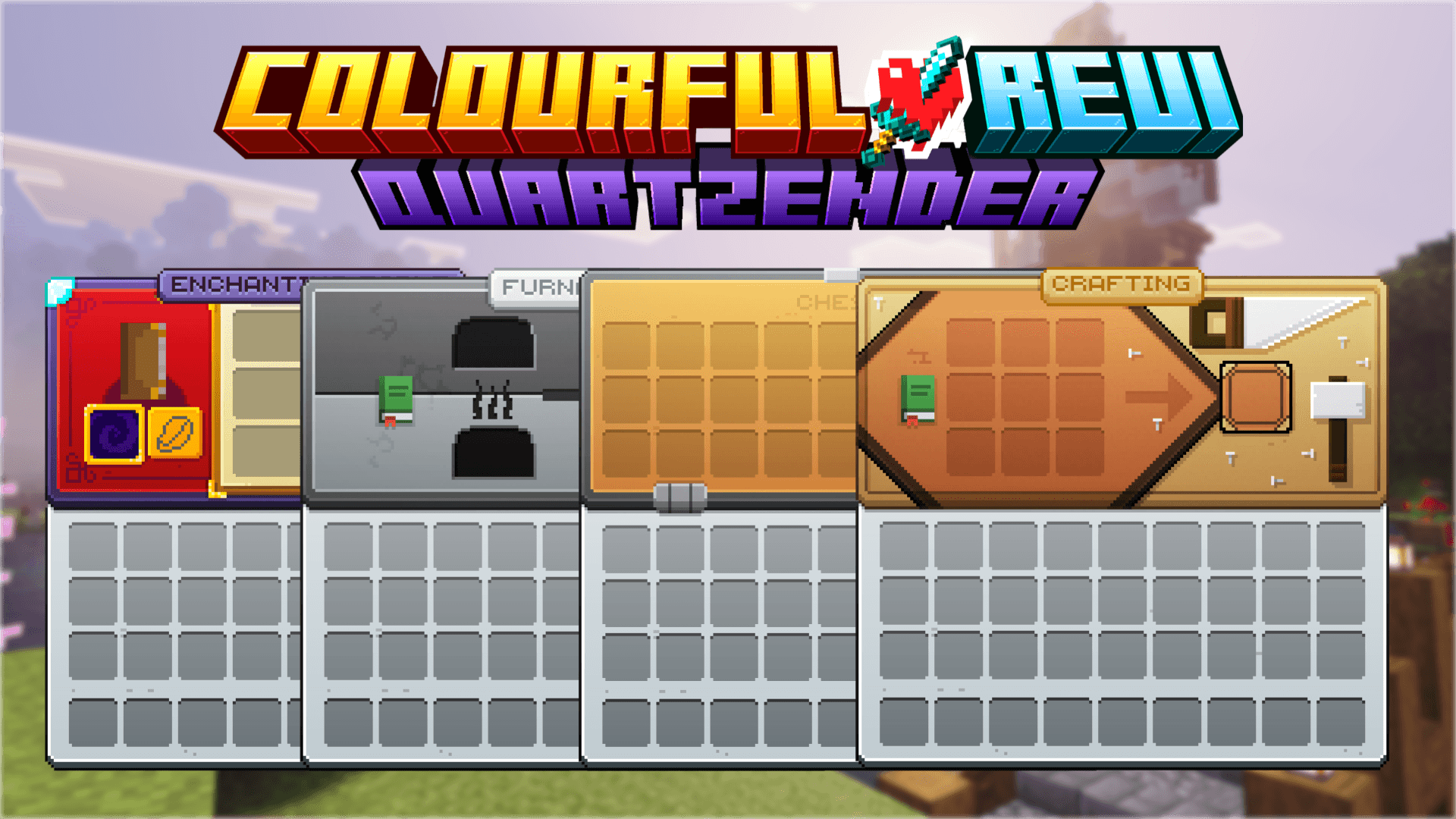
Colourful Ore UI is a resource pack that restyles Minecraft's inventory and container screens. The author calls it the official Bedrock port of MrGamingLoons' Java pack, and the manifest names QuartzEnder for the port. It touches interface files only: UI textures, one font, one sound and the screen definitions.

What it adds

What the pack changes

The download is one resource pack with 683 files inside. Nearly all the art sits in the UI folder.

  • 332 texture files in textures/ui, plus 9 in other texture folders.
  • 1 font file, 1 sound file and 28 language files.
  • It replaces vanilla screen definitions such as anvil_screen.json, beacon_screen.json, chest_screen.json and book_screen.json, plus files in a déesse_ui folder.

In-game options

The pack ships as subpacks. Open the gear icon on the pack in your resource pack list to switch between them.

In-game options
OptionPack
Vanilla HUDColourful OreUI 1.2.2
Full featuresColourful OreUI 1.2.2

Shulker box colours

The author says a shulker box screen only takes a colour when the box's name starts with one of the pack's prefixes. The name does not have to read Shulker Box, but without a prefix the screen shows the default colour.

Requirements and compatibility

  • The manifest's minimum game version is 1.26.60.
  • One resource pack, version 1.2.2, 1.29 MB as a .mcpack. The manifest declares the pbr capability.
  • No behavior pack and no script modules are in the download.
  • It replaces vanilla UI screen files, including _global_variables.json and _ui_defs.json. Another pack that changes the same screens clashes with it, and the pack higher in the list wins.

Get started

  1. Install it: how to install Minecraft Bedrock add-ons covers .mcaddon, .mcpack and .mcworld files on iOS, Android and Windows.
  2. Switch on the Colourful OreUI resource pack.
  3. Tap the gear icon on the pack and pick Full features or Vanilla HUD.
  4. Rename a shulker box in an anvil with one of the author's colour prefixes to colour its screen.

Version history

  • Colourful-OreUI-1.2.2.mcpack · Newest file, 1.29 MB. The author's update note from 8 November 2026 says the highlight slot image now draws under the items in containers, and a crash on the beacon screen without Dimzcraft's Advanced Container was fixed.
  • Colourful OreUI 1.2.1.mcpack · 1.33 MB.
  • Colourful OreUI 1.2.mcpack · 1.32 MB.
  • Colourful OreUI 1.1.2.mcpack · 1.32 MB.
  • Colourful OreUI 1.1.1.mcpack · 1.32 MB.

Questions and answers

Which Minecraft version does Colourful Ore UI need?
The manifest sets a minimum of 1.26.60.
Will it clash with other resource packs?
It replaces vanilla UI screen files, so any other pack that changes the same screens competes with it, and the pack higher in the list wins.
How do I colour a shulker box screen?
The author says the box's name must start with one of the pack's colour prefixes, otherwise the screen uses the default colour.

How we know

The numbers, names and commands on this page were read from the pack’s own files and from MCPEDL on . We did not play it, and we host no copy of it.

Read from: the publisher's page: summary · the publisher's page: files · the publisher's page: changelog 2026-11-08 · the publisher's page: description · file:Colourful-OreUI-1.2.2.mcpack · manifest.json · Colourful OreUI 1.2.2/manifest.json · Colourful OreUI 1.2.2/textures/ · Colourful OreUI 1.2.2/sounds/ · Colourful OreUI 1.2.2/texts/ · Colourful OreUI 1.2.2/font/ · Colourful OreUI 1.2.2/ui/