Bedrockmatika
BedrockAdd-onUtilityby SmokeyMedusa835
About this add-on
A blueprint workbench projector and debug stick, with companion web tools for preparing Minecraft Bedrock schematics.
Read the author’s full description (740 words)
Written by SmokeyMedusa835.
Hey everyone! 👋 This is my first big release on CurseForge. After about two weeks of building, reworking and polishing, I’m finally ready to share Bedrockmatika with you!
If you play Bedrock, you’ve probably searched for something like Java’s Litematica. So have I. I wanted a building tool that felt convenient, looked good and let me properly prepare a build before bringing it into the game. Eventually, I decided to try making my own.
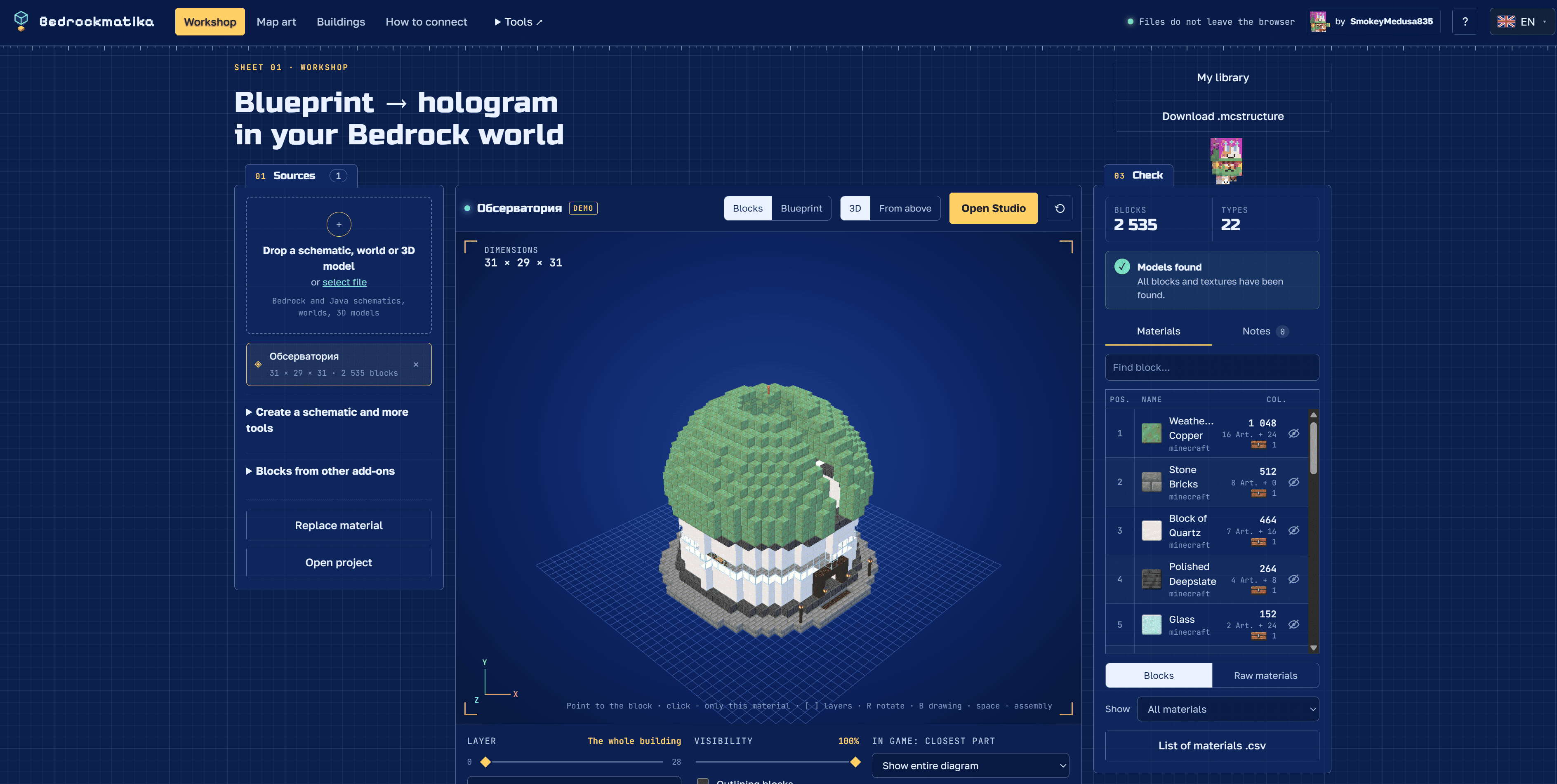
It grew into more than a hologram add-on: Bedrockmatika now has a whole web workshop for your schematics, too.
More than holograms 🛠️
On the website, you can open a build, explore it in 3D, check its layers and materials, then head into the Studio to make it your own.
Replace blocks, reshape parts of a building, use brushes and selections, work with symmetry or edit in first person. There’s even an experimental simulation of selected mechanics for trying out ideas — although it doesn’t replace testing in Minecraft.
Even if the add-on itself isn’t quite what you need, I hope you’ll find the editor useful. You can take a schematic from the internet, change it and export the result.
Supported formats include Bedrock .mcstructure, Litematica .litematic, Sponge .schem and Java structure .nbt. That means many builds you could previously find only as Java schematics can now be opened and prepared for Bedrock. Not every block converts perfectly, and Java mechanisms aren’t guaranteed to work unchanged — the editions still have their differences.
The website also includes mapart tools, 30 ready-to-open example builds, and a catalogue linking to interesting creations by other builders. I’d love to keep expanding that collection!
Your schematics, without asking the admin every time 🧱
This is the idea that made me want to build Bedrockmatika in the first place.
The world owner or server admin installs the shared add-on once. You then prepare your schematic on the website and activate your personal resource pack in your own Minecraft Global Resources.
A new build means a new personal pack, rather than another request to put your schematic into the server’s behavior pack.
In-game, you use the Bedrockmatika blueprint workbench projector to display the hologram, choose layers and adjust its position, rotation and appearance.
For remaining-material counts and placed-block checks, the website generates schematic data codes. You can copy them and paste them into the workbench menu. There’s a setup guide on the website to walk you through it.
The experience I’m aiming for is simple: bring your prepared schematic into a world that already has the shared add-on, and start building.
That said, I can’t promise identical results on every server or with every combination of packs yet. I haven’t tested Realms because I currently don’t have a way to do so. If you try it there, detailed feedback would be especially helpful.
I’ve also added a debug stick for creative mode, inspired by Java’s version. It lets you change supported block states; its functions are unavailable in survival.
A first release needs real players 💬
I’ve already checked a lot of things, but I don’t yet have enough real-world experience with the add-on to guarantee everything works perfectly. Bugs and rough edges are still possible.
If something goes wrong, please leave a comment with your Minecraft version, device, what happened and how to reproduce it. Screenshots help a lot, too. I’ll do my best to investigate and fix problems as I can.
If the workbench menu loses its custom appearance or loads incorrectly, try leaving the world and joining again. Rejoining sometimes helped in my own testing, but it’s a temporary workaround rather than a guaranteed fix. Please report those cases as well.
I really hope Bedrockmatika becomes useful in your builds. I’d love for you to download it, give it a try and tell me what’s missing. Seeing how it works for other players will help me decide where to take it next.
And there’s more on the way: I hope to share another big add-on soon, one I’ve been working on for about a month.
Thanks for stopping by, and happy building! 💙
Open Bedrockmatika — schematics, Studio and setup guide
Download the shared add-on from this CurseForge project’s Files tab. Use the web workshop to prepare personal packs for your own schematics.
Bedrockmatika is an independent, unofficial project and is not affiliated with Mojang, Microsoft or the developers of Litematica. External catalogue builds belong to their respective creators; source links are included in their cards.
Images
How to install
- Download the file below. On iOS or Android, open it from your Downloads with Minecraft; on Windows, double-click it.
- Minecraft imports the pack automatically. Enable it in your world’s settings under Behavior Packs or Resource Packs; an add-on usually needs both.
- Playing on a Realm or server? Everyone needs the same packs, and the host has to enable them.
- Starting a new world? Choose its seed first: the Seed Map shows villages, structures and biomes near spawn for any Bedrock seed.
Advertisement