All texture packs
Bluelock Ui
BedrockTexture packOtherby Alookhaogeff
About this texture pack
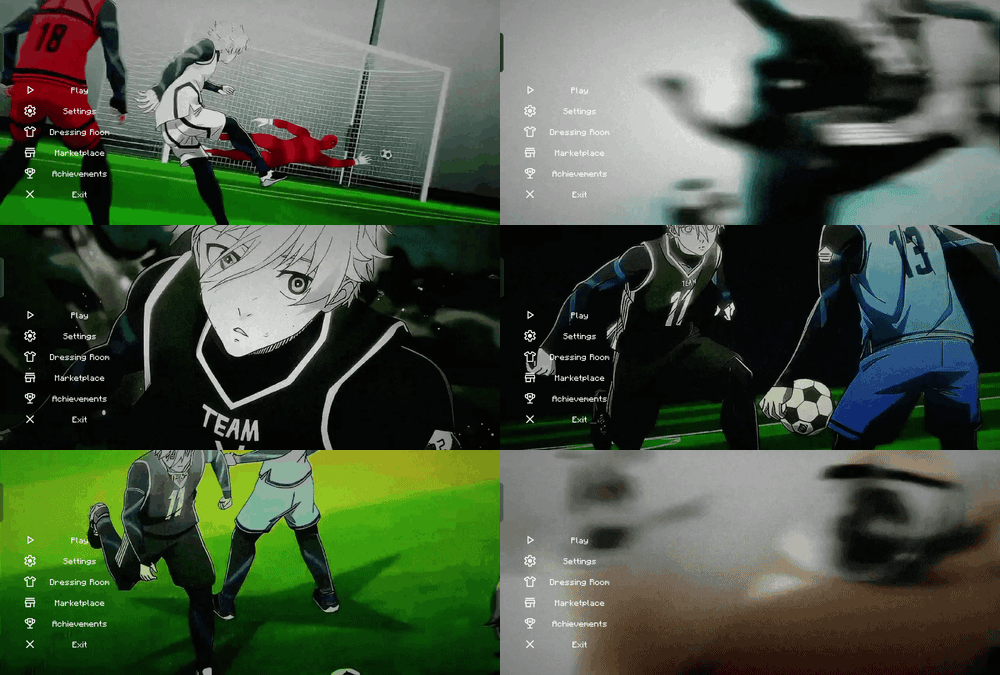
Bluelock-themed UI for Minecraft Bedrock: animated main menu and inventory, a quick-craft arrow, quick drop buttons, and an item panel on the left side.
Read the author’s full description (94 words)
Written by Alookhaogeff for the MCPEDL post, shown as published.
Bluelock Ui by alookhaogeff
A Bluelock-themed UI pack for Minecraft Bedrock Edition.
Features
- Animated main menu background (129 frames)
- Animated inventory background
- Quick craft: tap the crafting arrow to craft instantly
- Quick drop modes: Default, Move, Drop One and Drop All buttons next to the inventory
- Item list panel on the left side of the screen with a search bar
- Close button on the inventory
- Custom menu music, slightly louder
Installation
1. Download the .mcpack file and open it. Minecraft will import it.
2. Go to Settings > Global Resources and activate "Bluelock Ui".
Images
How to install
- Download the file below. On iOS or Android, open it from your Downloads with Minecraft; on Windows, double-click it.
- Minecraft imports the pack automatically. Enable it in your world’s settings under Behavior Packs or Resource Packs; an add-on usually needs both.
- Playing on a Realm or server? Everyone needs the same packs, and the host has to enable them.
- Starting a new world? Choose its seed first: the Seed Map shows villages, structures and biomes near spawn for any Bedrock seed.