Commands++
BedrockAdd-onUtilityby vertX_
About this add-on
Add more commands, that help you build, create, edit and test a lot of different things
Read the author’s full description (591 words)
Written by vertX_ for the MCPEDL post, shown as published.
📦 Commands
Enhance your Minecraft experience with Commands — a powerful utility addon for creators and developers!
This addon introduces custom commands designed to make item manipulation, command binding, and structure creation easier than ever before.
Use these commands to:
- Customize item lore and names
- Bind commands or functions to items
- Simulate explosions
- Create advanced multi-block structures
- Manage player states and effects
- Control world time and entity spawning
- World edit beta features
- Build paths and text with custom tools
📜 Commands List
Spoiler/addLore — Add lore to itemAdds a new line of lore text to the currently held item without replacing existing ones. /addlore "§6Cool sword" @s false Spoiler/setLore — Set lore for item
Replaces all existing lore on the item with the given text. /setlore "§bIce ability" Spoiler/bindCommand — Bind command to item
Binds a command to the currently held item. The command runs when the item is used. /bindCommand "give @s diamond 10" Spoiler/bindFunction — Bind function to item
Attaches a custom function (from a script or behavior pack) to the item. /bindFunction hello World Spoiler/explosion — Create explosion
Creates a customizable explosion at a specific location. /explosion 100 ~~~ true true Spoiler/heal — Heal player
Restores health and/or hunger for targeted players. /heal @s both Spoiler/setday — Set specific day
Sets the world to a specific day number, useful for triggering day-specific events (Christmas, Halloween, etc.). /setday 365 Spoiler/spawnentity — Advanced entity spawning
Spawns entities with optional equipment copying, tags, and effects. /spawnentity zombie 5 ~~~ @s "boss,elite" "strength:600:2,speed:1200:1" Spoiler/god — Toggle god mode
Grants or removes invincibility (Resistance V effect). /god @s 24000 Spoiler/burnentity — Set entity on fire
Sets targeted entities on fire for a specified duration. /burnentity @e[type=zombie,r=10] 10 Spoiler/knockback — Apply knockback force
Pushes entities away with customizable force and direction. /knockback @e[r=5] 3.0 90 1.0 Spoiler/createMultiBlock — Create special multi block
Turns the held item into a "MultiBlock" — a block that places a random block from a list when used.
Initialize MultiBlock: /createMultiBlock Add block to MultiBlock list: /addlore "§8 -minecraft:stone" Spoiler/multiBlockFill — Fill area with MultiBlock
Fills a large area (up to ~350,000 blocks) using a random selection from your MultiBlock list. /multiblockfill ~~~ ~32~32~32 Spoiler/clearlore — Remove all item lore
Clears all lore lines from the currently held item. /clearlore Spoiler/setitemname — Set item display name
Changes the custom name of the item you're holding. /setitemname "§dLegendary Blade" Spoiler/cloneitem — Clone held item
Creates an identical copy of the currently held item and gives it to the player. /cloneitem @s 1 @s 1 10 Spoiler/nv — Night vision
Grants night vision effect to targeted players. /nv @s 12000 Spoiler/findslot — Smart inventory search
Finds items in your inventory using partial name matching or tag filters. Includes multiple search modes. /findslot sword Spoiler/durability — Set item durability
Sets the durability of the held item to a specified percentage (0–100%). /durability 75 Spoiler/getslotitem — Get item info by slot
Shows detailed information about the item in a specific inventory or armor slot. /getslotitem hotbar 0 Spoiler/addblock — Add block to MultiBlock
Quickly adds a new block to the MultiBlock list using a valid block ID. /addblock minecraft:stone Spoiler/getpathtool — Get path tool
Gives a custom tool that allows you to place waypoints used for auto path building. /getpathtool Spoiler/buildpath — Build path
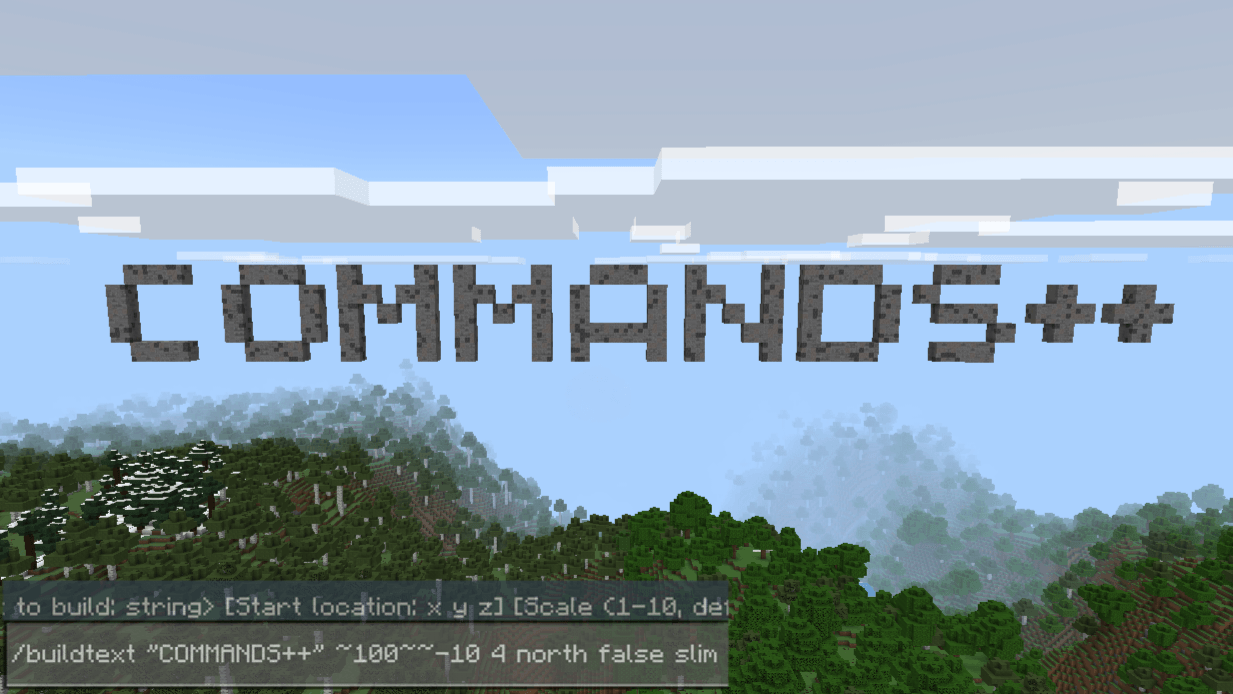
Automatically builds a path between waypoints placed by the path tool. /buildpath Spoiler/buildtext — Create 3D block text
Generates large block letters forming your message. (Beta feature) /buildtext Hello
💬 Found a bug? Want to suggest features or test new versions? Join the official Discord server
Images
What’s new in the latest update
The author’s notes for the file uploaded .
global variables for script:
Variables.create(name, value);
Variables.get(name);
Variables.delete(name);
Variables.add(name, valueToAdd);
Variables.update(name, newValue);
You can run scripts using /system run script "script here"
How to install
- Download the file below. On iOS or Android, open it from your Downloads with Minecraft; on Windows, double-click it.
- Minecraft imports the pack automatically. Enable it in your world’s settings under Behavior Packs or Resource Packs; an add-on usually needs both.
- Playing on a Realm or server? Everyone needs the same packs, and the host has to enable them.
- Starting a new world? Choose its seed first: the Seed Map shows villages, structures and biomes near spawn for any Bedrock seed.
Advertisement