Extra hearts
BedrockScriptUtilityby NightOps
About this script
Gain permanent extra hearts based on the max health of the mobs you hunt down and destroy!
Read the author’s full description (345 words)
Written by NightOps.
# 🩸 Kill to Gain Hearts (RPG Health Progression)
Tired of the standard 10-heart limitation in Minecraft Bedrock? **Kill to Gain Hearts** transforms your survival gameplay into an immersive RPG progression experience! The rules are simple: hunt dangerous monsters, slay them, and permanently expand your health bar based on how tough they were.
---
### ⚙️ How It Works (The Scaling Rule)
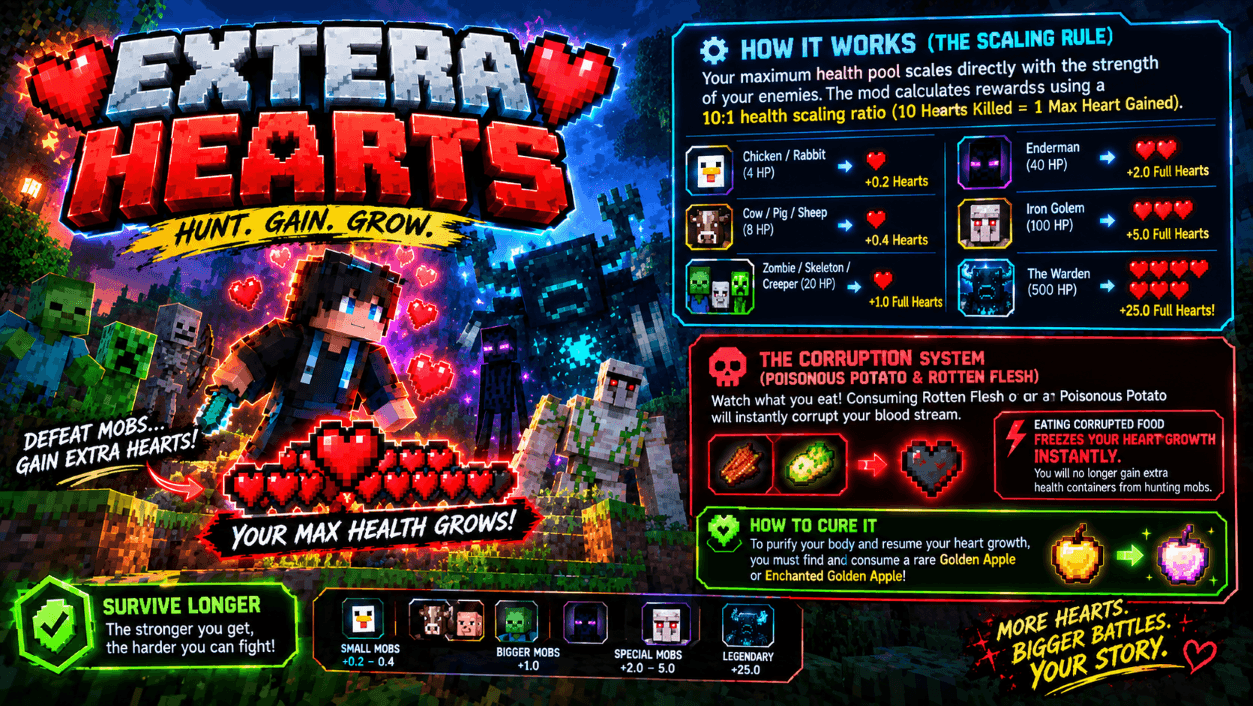
Your maximum health pool scales directly with the strength of your enemies. The mod calculates rewards using a **10:1 health scaling ratio** (10 Hearts Killed = 1 Max Heart Gained):
* 🐔 **Chicken / Rabbit** (4 HP) ➔ ** 0.2 Hearts**
* 🐷 **Cow / Pig / Sheep** (8 HP) ➔ ** 0.4 Hearts**
* 🧟♂️ **Zombie / Skeleton / Creeper** (20 HP) ➔ ** 1.0 Full Heart**
* 👁️ **Enderman** (40 HP) ➔ ** 2.0 Full Hearts**
* 🤖 **Iron Golem** (100 HP) ➔ ** 5.0 Full Hearts**
* 💀 **The Warden** (500 HP) ➔ ** 25.0 Full Hearts!**
---
### 🚫 The Corruption System (Poisonous Potato & Rotten Flesh)
Watch what you eat! Consuming **Rotten Flesh** or a **Poisonous Potato** will instantly corrupt your blood stream.
* ⚡ Eating corrupted food **FREEZES your heart growth instantly**. You will no longer gain extra health containers from hunting mobs.
* ✨ **How to cure it:** To purify your body and resume your heart growth, you must find and consume a rare **Golden Apple** or **Enchanted Golden Apple**!
---
### 💎 Premium Features & Parity Layout
* 🏆 **100% Achievement Friendly:** Built entirely using modern Bedrock Script API. Play vanilla survival and keep earning your Xbox Live Achievements!
* 🥛 **Milk Bucket Resistant:** Unlike basic mods that rely on unstable potion effects, this addon intercepts milk bucket consumption. Your hard-earned extra hearts will **never** disappear when drinking milk.
* 💾 **Persistent Auto-Save:** Powered by world-embedded dynamic properties. Your accumulated bonus health bars are automatically saved to your profile and reload instantly when you rejoin or restart your world.
* ❌ **Zero File Conflicts:** Operating entirely through Javascript code with no overrides to the vanilla `player.json` file. It is 100% compatible with armor packs, animation packs, and weapon addons!
---
### 🛠️ Installation Instructions
1. Download the `.mcpack` file.
2. Double-click to automatically import it into Minecraft Bedrock.
3. Apply the **Behavior Pack** to your chosen world.
4. **Important:** Ensure that **Beta APIs** is enabled under the "Experiments" toggle in your world settings!
How to install
- Download the file below. On iOS or Android, open it from your Downloads with Minecraft; on Windows, double-click it.
- Minecraft imports the pack automatically. Enable it in your world’s settings under Behavior Packs or Resource Packs; an add-on usually needs both.
- Playing on a Realm or server? Everyone needs the same packs, and the host has to enable them.
- Starting a new world? Choose its seed first: the Seed Map shows villages, structures and biomes near spawn for any Bedrock seed.
Advertisement