All texture packs
Glowing Ores
BedrockTexture packRealisticby voxenMC2
About this texture pack
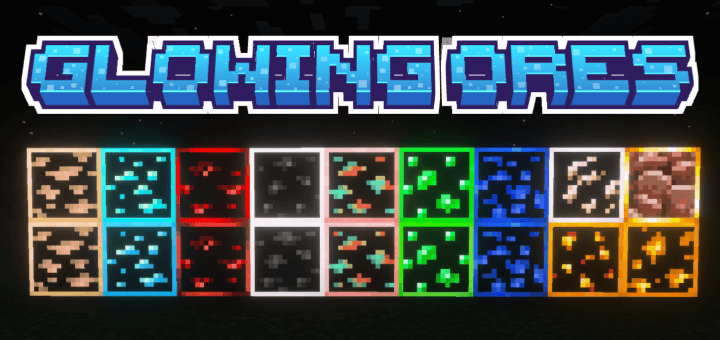
Glowing Ores is a texture pack that makes all ores emit a gentle glow, making them easier to find while mining. It enhances visibility in caves while keeping the original Minecr...
Read the author’s full description (168 words)
Written by voxenMC2.
Glowing Ores is a texture pack that makes all ores emit a gentle glow, making them easier to find while mining. It enhances visibility in caves while keeping the original Minecraft style.
Benefits: You can easily find ores without using torches or night vision. Perfect for mining and exploring dark areas with improved visibility.Subpacks Included:
- Outlined Ores: Adds a clean outline around each ore for better visibility.
- Outlined Ores Glow : Same as outlined version but with a stronger glow effect.
- No Outline Ores: Keeps ores in their normal shape but adds a smooth glow effect.
- Animated Glowing Ores: Adds a dynamic, moving glow effect to the ores for a more immersive feel.
Important: To use this pack, make sure Vibrant Visuals are turned ON in your game settings. Without this, the pack will not work properly.
Want Animated Glowing Ores which offers more than 20 animations?
Checkout MCPEDL: https://mcpedl.com/animated-glowing-ores-voxen/
CurseForge: https://www.curseforge.com/minecraft-bedrock/texture-packs/animated-glowing-ores-voxen
Images
What’s new in the latest update
The author’s notes for the file uploaded .
- Minor glowing tweaks
- Updated to latest version
- Compatible with new version
How to install
- Download the file below. On iOS or Android, open it from your Downloads with Minecraft; on Windows, double-click it.
- Minecraft imports the pack automatically. Enable it in your world’s settings under Behavior Packs or Resource Packs; an add-on usually needs both.
- Playing on a Realm or server? Everyone needs the same packs, and the host has to enable them.
- Starting a new world? Choose its seed first: the Seed Map shows villages, structures and biomes near spawn for any Bedrock seed.
Advertisement
More texture packs
- Texture packs
Dark Fantasy Visuals (Bedrock Resource Pack)
by Starfish Studios Inc
- Downloads
- 1.4M
- Rating
- 4.0





