Grafika Shader
BedrockTexture packRealisticby daniswastaken
About this texture pack
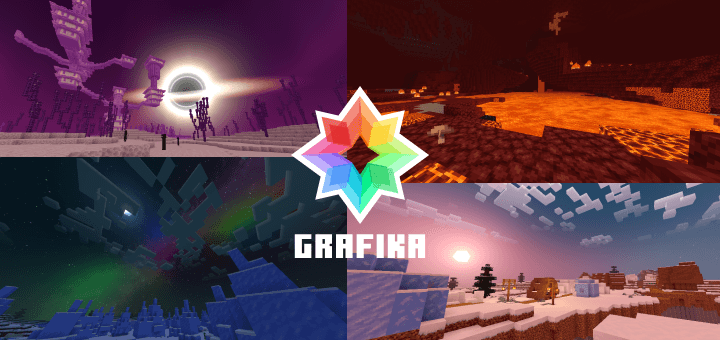
An anime-style shader pack.
Read the author’s full description (240 words)
Written by daniswastaken for the MCPEDL post, shown as published.
This Shader Supports MC 26.50 and Above!
Grafika V2.6.1
New Update: LITE version now also have Blackhole!
Grafika is an anime-styled, simple and lightweight but still beautiful shader for Minecraft.
Anime-Style
It's "Anime-Style" because of the Outlines given to every player that looks like in anime series.
Features
- The Singularity. Cinematic black hole in the End dimension.
- Glowing Ores. All ores now glow in the dark.
- Performance First. Lightweight and fast on low-end device.
Subpacks To Choose
- Shader Only: Just the shader. No outlines.
- Player Outline: Anime-style outlines for players and shader.
Simple to Install
- Supported On: Windows, Android, iOS.
- Requirements: BetterRenderDragon, Minecraft Patched, Matject, or MB Loader.
THE PLAYER OUTLINE ONLY WORKS WITH WINDOWS
If you're on an Android or iOS, the OUTLINE will glitch but THE SHADER STILL 100% WORKS. I'm currently fixing it.
GRAFIKA SHADER IS VERY LIGHTWEIGHT!
For the best experience, please try the PRO version first before using the LITE version.
LICENSE
GRAFIKA SHADER IS NOT AFFILIATED, RELATED, OR REGISTERED UNDER THE NEWB BRAND. GRAFIKA SHADER STANDS AS IT'S OWN SEPARATE ENTITY AND FULLY COMPLY WITH ANY LICENSING AND COPYRIGHT LAWS AS CONFIRMED BY THE NEWB ADMIN.
THE ENTIRETY OF GRAFIKA SHADER (NOT INCLUDING TEXTURES OBTAINED FROM VANILLA TWEAKS AND/OR BEDROCK TWEAKS) IS LICENSED UNDER THE MIT LICENSE, FREE TO USE FOR MODIFICATIONS OR REDISTRIBUTION AND AVAILABLE ON GITHUB.
SpoilerCredits:
- Vanilla Tweaks: https://vanillatweaks.net/
- Bedrock Tweaks: https://bedrocktweaks.net/
- Icona: https://github.com/daniswastaken/icona
Images
What’s new in the latest update
The author’s notes for the file uploaded .
NEW UPDATES:
- Update to support latest Minecraft version.
- Performance optimization on galaxy sky.
How to install
- Download the file below. On iOS or Android, open it from your Downloads with Minecraft; on Windows, double-click it.
- Minecraft imports the pack automatically. Enable it in your world’s settings under Behavior Packs or Resource Packs; an add-on usually needs both.
- Playing on a Realm or server? Everyone needs the same packs, and the host has to enable them.
- Starting a new world? Choose its seed first: the Seed Map shows villages, structures and biomes near spawn for any Bedrock seed.
Advertisement
More texture packs
- Texture packs
Dark Fantasy Visuals (Bedrock Resource Pack)
by Starfish Studios Inc
- Downloads
- 1.4M
- Rating
- 4.0





