Hold To Enchant — Auto Enchant
BedrockScriptUtilityby BeraGG
About this script
Simply Hold Your Tools To Enchant! (Achievement Friendly)
Read the author’s full description (419 words)
Written by BeraGG for the MCPEDL post, shown as published.
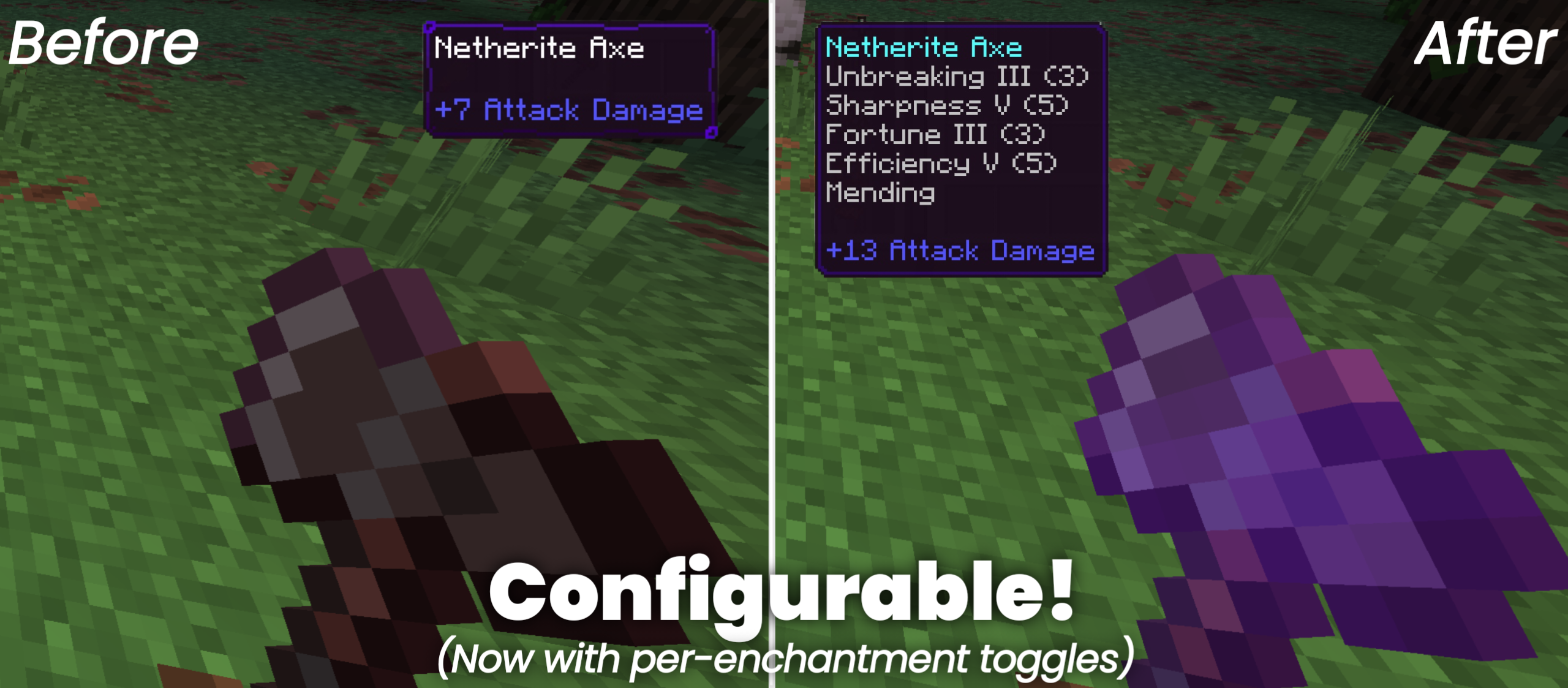
Hold to Enchant is a script-based utility that immediately enchants the item you're holding to the max level. Simply hold an item, and the add-on handles the rest.
--- This add-on doesn't disable achievement.
MAIN FEATURES
Instant Enchanting — Automatically applies relevant enchants the moment you hold an item. Swords get Sharpness V, Looting III, Fire Aspect II, and Unbreaking III. Picks get Fortune III or Silk Touch. And so on.
Conflicting Enchantments — Use the configuration menu to choose between conflicting enchants like Silk Touch vs Fortune, Mending vs Infinity, or Depth Strider vs Frost Walker — no guesswork needed.
(NewBows add-on from SystemTv)
Universal Compatibility — Works for all vanilla tools, weapons, and armor, plus custom items from other add-ons.
Perfect combo with my other add-on Fortune Extender — Duplicate any block you mine with Fortune enchantment!
⚙️TECHNICAL DEEP-DIVE
The engine is event-driven, subscribing to playerHotbarSelectedSlotChange and playerInventoryItemChange instead of polling on a fixed interval. Enchanting only runs when the player switches hotbar slots or a new item lands in the active slot.
- It scans EquipmentSlot.Mainhand against a lookup table called ENCHANTABLE_ITEMS.
- Once a category is identified, buildCommands() generates a sequence of player.runCommand() calls tailored to that specific item type.
- For add-on compatibility, the script includes a namespace fallback. If a custom item like example:example_sword isn't found in the lookup table, the code strips the namespace and checks whether the ID ends with _sword, _axe, _pickaxe, etc., to assign the correct enchantment set automatically. This prevents the script from spamming attempts on items that can't be enchanted.
--- NOTE: Only vanilla enchantments supported!
PERFORMANCE
- Item Cache — To prevent the add-on from spamming commands every tick, it uses a Map with a "playerId:slot:typeId" composite key.
- Lightweight Footprint — Since the actual enchanting is delegated to native /enchant commands, JavaScript overhead is kept to a minimum.
CONFIGURATION
Type /ae:menu in chat to open your personal settings panel.
- Custom Command — Registered via customCommandRegistry on system.beforeEvents.startup, so it supports autocomplete and works even with cheats disabled. No custom item or entity required.
- Per-Player Persistence — Your preferences (like choosing Smite over Sharpness) are saved via player.setDynamicProperty(), so they persist across sessions.
- Item Toggles — Don't want your pickaxe auto-enchanted? You can disable it here
NEW IN VERSION 1.1.0:
- Enchant Blacklist — Blacklist an enchantment you don't want from auto enchant specifically.
And DON'T FORGET to submit!
TECHNICAL SPECS
Type : Behavior Pack (Script)
Min Engine Version : 1.21.20
@minecraft/server : 2.6.0
@minecraft/server-ui : 2.0.0
HOW TO INSTALL
1. Download the .mcpack file.
2. Import to Minecraft.
3. In your world settings, activate the behavior pack.
What’s new in the latest update
The author’s notes for the file uploaded .
V1.2.8 UPDATE CHANGELOG
Added automatic enchanting when equipping armor pieces (Helmet, Chestplate (and Elytra), Leggings, Boots) and Offhand items (Can be turned off in the settings menu).
- Refined the notifications from this addon.
- Fixed minor bug where dropdown values resetting to default after turning off the master switch.
Achievement issue in 26.50/26.51 is a known Minecraft bug.
How to install
- Download the file below. On iOS or Android, open it from your Downloads with Minecraft; on Windows, double-click it.
- Minecraft imports the pack automatically. Enable it in your world’s settings under Behavior Packs or Resource Packs; an add-on usually needs both.
- Playing on a Realm or server? Everyone needs the same packs, and the host has to enable them.
- Starting a new world? Choose its seed first: the Seed Map shows villages, structures and biomes near spawn for any Bedrock seed.
Advertisement