Newb Aerotion | compatible with minecraft 26.50+
BedrockTexture packRealisticby Goboyy22
About this texture pack
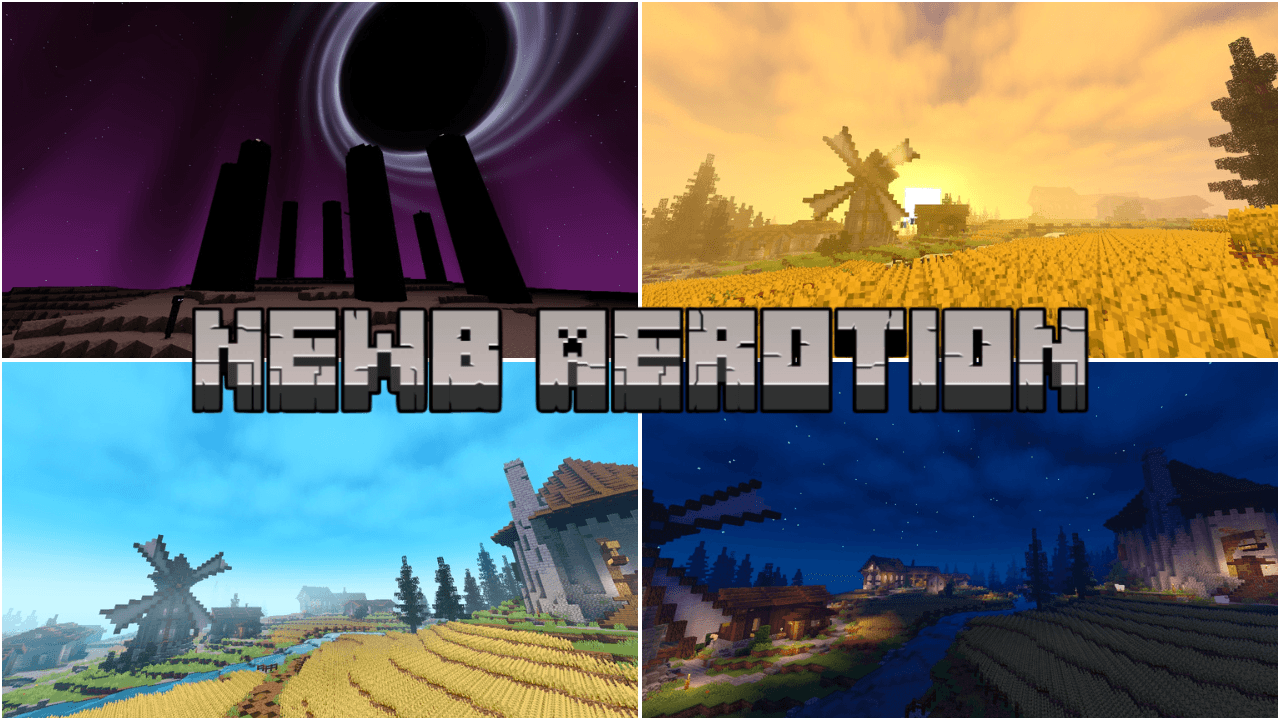
A shader that is perfect for you to survive, with bright lighting, dynamic skies, and a comfortable atmosphere for your game.
Read the author’s full description (429 words)
Written by Goboyy22.
A newb variant with bright lighting, a warm atmosphere, dynamic skies, and balanced colors.
Designed specifically for anyone who enjoys brightly themed shaders suitable for survival.
Numerous effects enhance this shader and enhance the visuals.
This shader requires a balanced (mid-range) device.
While the numerous effects may require a suitable device, you can still use this shader on low-end devices by using the low subpack.
The low subpack is designed with minimal effects, and some are disabled to improve performance on low-end devices.
=====================================================================================
Please read until the end so you understand it!!
FEATURED
• Vibrant lighting
• Dynamic sky
• Vanilla sun/moon
• Blocky vanilla clouds
• Blue water
• Water waves & reflection
• Atmospheric Rain
• Dynamic fog/mist
• Emmisive lighting
• Ore glow
• Animated vegetation
• Custom nether atmospher
• Custom the end atmospher
• Black hole at the end
• Raindrops
• Rainwater puddles
=====================================================================================
SUBPACKS
• Default:
Main visual experience with all effects eneble. May be demanding on some device.
• Low:
Reduce of quality of certain effects or desables some effects for better performance.
=====================================================================================
NOTES
• Compatible only with minecraft version 26.50
• Compatible with Linux, Windows, Android, and iOS.
• Performance may vary depending on device specifications and minecraft setting.
• Some visual effect may look different depending on graphic setting, render distance, and device performance.
• Clouds require Beautiful Graphics. If you are using Simple Graphics, clouds may not work correctly.
• Additional tools and tutorials are available through the Newb community in the MCBE Patches section.
=====================================================================================
CREDITS
Newb Aerotion is based on the Newb Shader project.
Special thanks to everyone in the Newb community who contributed ideas, testing, feedback, and technical assistance throughout the development of this shader.
Special thanks to:
• Devendrn
• REXYTMC
• SetBr0ken
• KrispyBRN
• Indeed
• Ale complementary and Ale evermist
• JesusMiguel Gamer
• nickellynx
• kurinkishi
• Ethereal
• TryzzMC, documentation map, Medieval Village - Gendry's Tavern.
And to everyone else who contributed to the development and testing of Newb Aero Reimagined — thank you for helping make this project possible.
=====================================================================================
COPYRIGHT
Original Source: Newb Shader
Original Author: Devendrn
Newb Aerotion is a modified shader project based on the original Newb Shader.
Proper copyright claims are prohibited.
Users may use Newb Aerotion for personal use or redistribute it only when proper credit is provided, including a link to the original CurseForge or MCPEDL page and credit to the modifier/developer.
Do not claim the original Newb Shader or its source code as your own.
=====================================================================================
Do you have any suggestions or criticisms? Please join Newb Aerotion Feedback to report them.
Your suggestions and criticisms will be useful for this shader.
You can also join Newb Aerotion for the latest info and spoilers.
Thank you for using and supporting this shader, enjoy!!
Images
What’s new in the latest update
The author’s notes for the file uploaded .
• compatible with minecraft version 26.50+
• new cloud models (only in the default subpack)
• improved water clarity and color adjustments
• fixed bluish and washed-out shadows
How to install
- Download the file below. On iOS or Android, open it from your Downloads with Minecraft; on Windows, double-click it.
- Minecraft imports the pack automatically. Enable it in your world’s settings under Behavior Packs or Resource Packs; an add-on usually needs both.
- Playing on a Realm or server? Everyone needs the same packs, and the host has to enable them.
- Starting a new world? Choose its seed first: the Seed Map shows villages, structures and biomes near spawn for any Bedrock seed.
Advertisement
More texture packs
- Texture packs
Dark Fantasy Visuals (Bedrock Resource Pack)
by Starfish Studios Inc
- Downloads
- 1.4M
- Rating
- 4.0





