Smooth Rain : Helloween Update
BedrockTexture packRealisticby Verocrft
About this texture pack
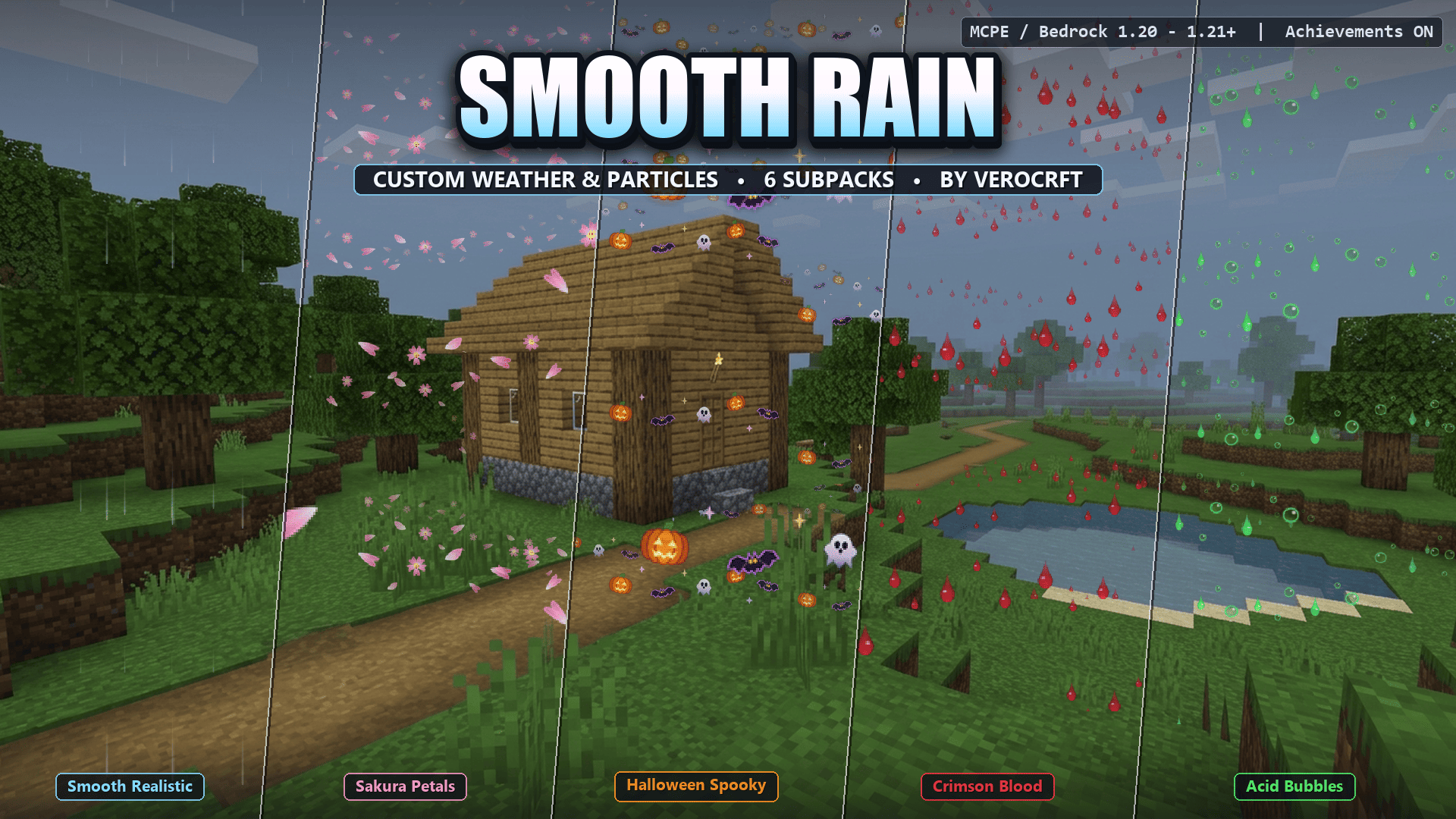
Replace noisy Minecraft rain with 6 handcrafted weather modes: realistic, minimal, Sakura petals, Halloween, blood, and acid. Switch with a slider. Resource pack only, achieveme...
Read the author’s full description (535 words)
Written by Verocrft.
Smooth Rain
Custom Weather & Particle Effects for Minecraft Bedrock
Replace noisy, vision-blocking rain with 6 handcrafted weather modes, switchable anytime from a simple slider.
Achievement Friendly • 6 Weather Modes • Key Features • Installation • Compatibility • Changelog
Smooth Rain revamps Minecraft Bedrock's default noisy, vision-blocking rain into clean, atmospheric, and customizable weather. Choose anything from silky-smooth natural raindrops and FPS-friendly minimal droplets to custom-shaped falling Sakura petals, Halloween icons, glossy blood drops, and toxic acid bubbles.
Built on Bedrock's native Subpack Slider, you can switch between 6 handcrafted weather modes anytime from your Resource Pack settings, without installing multiple packs.
Achievement Friendly
Keep earning achievements and trophies. Smooth Rain is a pure Resource Pack, with no Behavior Pack and no experimental toggles required, so your survival worlds stay fully achievement-enabled.
The 6 Weather Modes
# Mode Visual Style 1 Smooth Realistic (Default) Soft, anti-aliased sky-blue to white rain streaks with gentle gradient tails and natural visibility. 2 Clear Drops (Minimal / FPS) Ultra-clean, low-opacity micro-droplets designed for PvP, building, and low-end devices. 3 Sakura Pink (Petals) Fluttering notched cherry blossom petals and 5-petal mini sakura flowers drifting from the sky. Also replaces snow in cold biomes. 4 Halloween (Spooky) A seasonal mix of glowing Jack-o'-Lantern pumpkins, neon-rimmed flying bats, spooky mini ghosts, and embers. 5 Crimson Blood (Drops) Viscous 3D liquid blood teardrops with wet specular highlights and micro-droplet splatters. 6 Acid Toxic (Bubbles) Translucent neon-green radioactive bubbles mixed with dripping toxic slime globules.All previews below show the actual in-game look in vanilla Minecraft Bedrock, with no shaders.
1. Smooth Realistic (Default)
Soft, anti-aliased sky-blue to white rain streaks with gentle gradient tails and natural visibility.
2. Clear Drops (Minimal / FPS)
Ultra-clean, low-opacity micro-droplets designed for PvP, building, and low-end devices.
3. Sakura Pink (Petals)
Fluttering notched cherry blossom petals and 5-petal mini sakura flowers drifting from the sky. Also replaces snow in cold biomes.
4. Halloween (Spooky)
A seasonal mix of glowing Jack-o'-Lantern pumpkins, neon-rimmed flying bats, spooky mini ghosts, and embers.
5. Crimson Blood (Drops)
Viscous 3D liquid blood teardrops with wet specular highlights and micro-droplet splatters.
6. Acid Toxic (Bubbles)
Translucent neon-green radioactive bubbles mixed with dripping toxic slime globules.
---Key Features
- 100% original handcrafted HD weather sheets (256x256): crisp pixel art and smooth alpha gradients made specifically for Bedrock's weather renderer.
- Survival and Realm friendly: a pure Resource Pack that keeps Xbox, PlayStation, and Mobile achievements on.
- Zero FPS drop: lightweight optimized PNG sprites (under 25 KB per mode) with memory_tier: 0 compatibility for all devices.
- Themed cold biomes: snowfall automatically matches your selected theme, such as sakura petal snowfall, spooky Halloween snow, or HD ice crystals.
Installation & How to Switch Modes
- Download Smooth Rain.mcpack.
- Open the file to import it into Minecraft Bedrock automatically.
- Go to Settings > Global Resources (or World Settings > Resource Packs) and activate Smooth Rain RP.
- Click the gear (Settings) icon on Smooth Rain RP.
- Drag the Subpack Slider to choose one of the 6 weather modes, then close the settings to apply.
Compatibility
- Minecraft Bedrock 1.20.0 to 1.21 .
- Resource Pack only. No Behavior Pack and no experimental toggles, so achievements stay enabled.
- Works on Windows, mobile, and console, in singleplayer, multiplayer servers, and Realms.
- Lightweight enough for low-end devices.
Images
What’s new in the latest update
The author’s notes for the file uploaded .
v1.0.0 (Initial Release)
- 6 handcrafted weather modes selectable with the Subpack Slider: Smooth Realistic, Clear Drops, Sakura Pink, Halloween, Crimson Blood, and Acid Toxic.
- Themed snowfall for cold biomes that matches the selected mode.
- Optimized HD 256x256 weather sheets under 25 KB per mode.
- 100% Achievement Friendly resource pack with no experimental toggles.
How to install
- Download the file below. On iOS or Android, open it from your Downloads with Minecraft; on Windows, double-click it.
- Minecraft imports the pack automatically. Enable it in your world’s settings under Behavior Packs or Resource Packs; an add-on usually needs both.
- Playing on a Realm or server? Everyone needs the same packs, and the host has to enable them.
- Starting a new world? Choose its seed first: the Seed Map shows villages, structures and biomes near spawn for any Bedrock seed.
Advertisement
More texture packs
- Texture packs
Dark Fantasy Visuals (Bedrock Resource Pack)
by Starfish Studios Inc
- Downloads
- 1.4M
- Rating
- 4.0





