All scripts
TC Bedrock Breaker
BedrockScriptUtilityby ToanCao
About this script
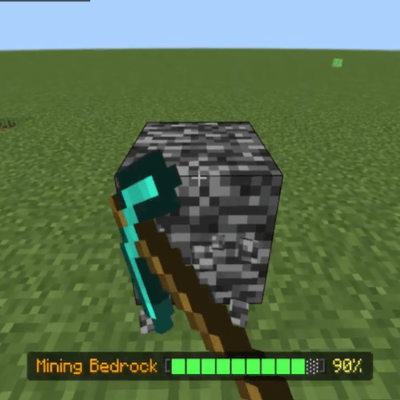
TC Bedrock Breaker enables players to break Bedrock, Barrier, Reinforced Deepslate, and any unbreakable block in Survival mode through continuous mining.
Read the author’s full description (368 words)
Written by ToanCao.
TC Bedrock Breaker
Important Notes Minecraft Bedrock 1.26.40 or later is required.
TC Bedrock Breaker is a utility add-on for Minecraft Bedrock that allows players to mine and break Bedrock, Barrier, Reinforced Deepslate, and any other unbreakable blocks in Survival mode through sustained mining.
How It Works
- Hold left-click (mine) on Bedrock, Barrier, Reinforced Deepslate, Command Blocks, Structure Blocks, or any unbreakable block with a valid pickaxe.
- An Actionbar HUD displays the current block name and mining progress percentage.
- Sound and particle effects play continuously during mining.
- When mining completes 100%, the block breaks and drops naturally as an item entity on the ground at that exact spot (it does not go straight to inventory).
- Releasing the mine button or looking away from the block cancels the progress safely.
Speed Presets (Kits) & Balanced Timings
The add-on features a Kit preset system accessible via /tc:bedrock:
- Normal Kit (Balanced): Balanced authentic survival progression:
- Netherite Pickaxe: 75 seconds (over 1 minute)
- Diamond Pickaxe: 100 seconds
- Iron Pickaxe: 150 seconds (2.5 minutes)
- Golden Pickaxe: 60 seconds (1 minute)
- Stone Pickaxe: 4 minutes
- Wooden Pickaxe: 6 minutes
- Fast Kit (Turbo): Instant creative-like fast mining (Netherite ~2s, Diamond ~4s).
- Ultra Slow Kit (Hardcore Extreme): The ultimate survival challenge:
- Netherite Pickaxe: 3 minutes (180s)
- Diamond Pickaxe: 4 minutes (240s)
- Iron Pickaxe: 6 minutes
- Severe Tool Damage: Deducts 150 durability points upon breaking a block.
- Recoil Damage: 15% random chance every second to take 1 HP recoil damage during mining.
- Extreme Hunger Loss: Rapidly drains hunger every 2 seconds of mining, plus an extra 3 food icons loss on completion.
- Custom: Customize individual pickaxe timings via sliders.
Enchantments & Status Effects
- Efficiency Enchantment (EC): Automatically increases mining speed for each level of Efficiency on your pickaxe (levels I through V reduce required time up to ~55%).
- Haste Status Effect: Grants 20% faster mining per Haste level (from Beacons or Potions).
- Mining Fatigue Effect: Reduces mining speed accordingly.
Settings & Commands
- /tc:bedrock - Opens the Bedrock Breaker settings menu to choose Kit presets, adjust timings, toggle Actionbar display, and configure durability cost.
Installation
- Import the .mcpack file into Minecraft.
- Apply the Behavior Pack to your world.
- No Experimental Features are required.
Support
- Ko-fi: https://ko-fi.com/toancao
- YouTube: https://www.youtube.com/@toancaomc
- Discord: https://discord.gg/9rch87H9yM
- CurseForge: https://www.curseforge.com/members/toancao/projects
What’s new in the latest update
The author’s notes for the file uploaded .
- Initial release of TC Bedrock Breaker.
- Added support for mining all unbreakable blocks (Bedrock, Barrier, Reinforced Deepslate, Command Block, Structure Block...).
- Added full support for all pickaxe tiers: Netherite, Diamond, Iron, Gold, Stone, Wood, plus dynamic support for all custom and modded pickaxes.
- Balanced Normal Kit timing with Netherite taking over 1 minute (75s).
- Implemented Hardcore Ultra Slow Kit (2.5-4+ minutes mining, massive 150 durability penalty, recoil damage, and rapid hunger drain).
- Added Preset Kits system (Normal Balanced, Fast Turbo, Ultra Slow Hardcore, and Custom).
- Added automatic speed scaling for Efficiency pickaxe enchantment (levels I to V).
- Added integration for Haste and Mining Fatigue status effects.
- Added natural dropped item entity upon block destruction directly at block location.
- Added dynamic block name and percentage Actionbar indicator.
- Added in-game settings menu via `/tc:bedrock`.
How to install
- Download the file below. On iOS or Android, open it from your Downloads with Minecraft; on Windows, double-click it.
- Minecraft imports the pack automatically. Enable it in your world’s settings under Behavior Packs or Resource Packs; an add-on usually needs both.
- Playing on a Realm or server? Everyone needs the same packs, and the host has to enable them.
- Starting a new world? Choose its seed first: the Seed Map shows villages, structures and biomes near spawn for any Bedrock seed.
Advertisement