Ultra Realism | High Realistic | 3D Blocks,Glowing Ores | Beautiful
BedrockTexture packRealisticby PrabhatPie
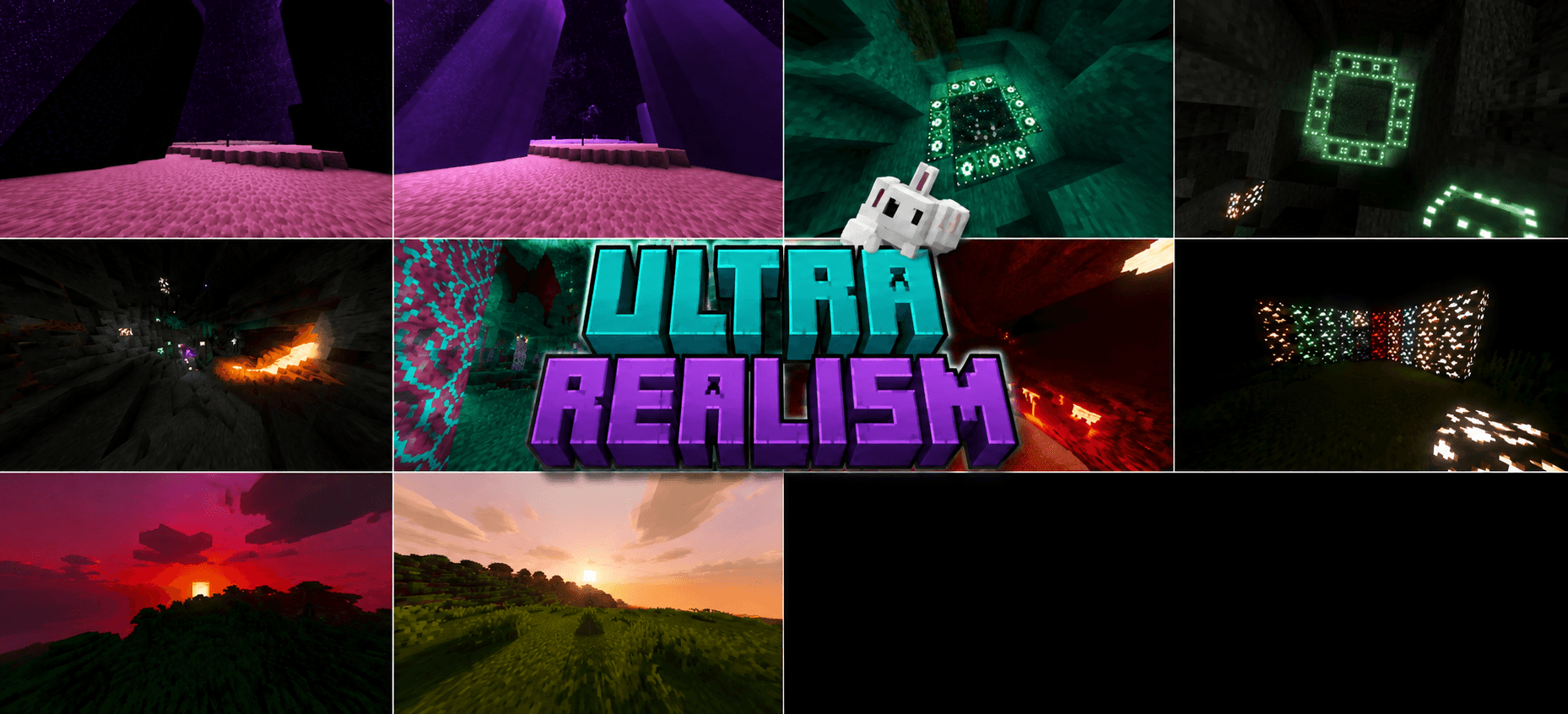
About this texture pack
The Best Realastic Shader For MCPE.
Read the author’s full description (854 words)
Written by PrabhatPie.
🌌✨ ULTRA REALISM — BEDROCK VISUAL PACK
🔥 Transform Minecraft Bedrock into a cinematic, vibrant and immersive world.
🌎 Experience enhanced lighting, realistic atmosphere, dynamic fog, PBR materials, glowing blocks, beautiful skies, improved water and dimension-specific visuals — all designed to make every world feel more alive.
🌌 ULTRA REALISM
⚡ Cinematic Lighting • 🌫️ Dynamic Atmosphere • 💎 PBR • 🌊 Realistic Water • ✨ Emissive Blocks
💜 **Made for Minecraft Bedrock Edition**
🌟 ━━━ OVERVIEW ━━━ 🌟
Ultra Realism is a highly detailed visual pack designed to completely enhance the Minecraft Bedrock experience.
From glowing caves and colorful Nether environments to atmospheric End landscapes and beautiful Overworld sunsets, every major visual system has been carefully enhanced.
🎨 What makes Ultra Realism special?
Feature Status 🌅 Dynamic Lighting ✅ 🌫️ Atmospheric Fog ✅ 🌌 Enhanced Sky ✅ 💎 PBR Materials ✅ ✨ Emissive Lighting ✅ 🌊 Animated Water ✅ ☀️ Sun Rays ✅ 🌙 Moon Lighting ✅ 🎨 Color Grading ✅ 🔥 Nether Enhancements ✅ 🟣 End Enhancements ✅ 🌲 Biome Atmosphere ✅ 💡 Colored Block Lighting ✅ 🌧️ Atmospheric Effects ✅🌈 ━━━ VISUAL SYSTEM ━━━ 🌈
💡 Dynamic Lighting
Ultra Realism introduces a much richer lighting system.
Lighting isn't simply brighter — different environments and blocks receive their own visual identity.
- ☀️ Dynamic sunlight
- 🌅 Warm sunrise lighting
- 🌇 Dramatic sunset lighting
- 🌙 Cool moonlight
- 🔥 Warm fire lighting
- 💡 Colored local lighting
- 🌌 Dimension-specific illumination
- ✨ Enhanced highlights
- 🌑 Improved shadows
✨ EMISSIVE & GLOWING BLOCKS
Many blocks receive their own visual glow and lighting characteristics.
Block / Source Glow / Lighting 🔥 Torch 🟠 Warm Orange 🔥 Soul Fire 🔵 Cyan 🔴 Redstone 🔴 Red 🟣 Nether Portal 🟣 Purple 💜 Amethyst 🟣 Violet 🟢 End Portal 🟢 Green 💠 Sculk 🔵 Cyan 🌋 Lava 🟠 Orange 💡 Froglights 🌈 Multiple tones 🕯️ Candles 🎨 Individual colors✨ The result: caves, structures and dark areas can feel dramatically more alive.
💎 ━━━ PBR MATERIALS ━━━ 💎
Ultra Realism includes extensive Physically Based Rendering (PBR) resources.
🧱 PBR Enhancements
- ✨ Improved surface response
- 🌑 Better shadow depth
- 💡 Enhanced light interaction
- 🪨 More detailed materials
- 🔥 Emissive surfaces
- 🌊 Specialized water materials
- 🌌 Dimension-specific materials
📦 Pack Content
Resource Amount 📁 Total Files 2,420 🖼️ PNG Textures 1,150 💎 PBR/TGA Maps 500 📜 JSON Configurations 700 🌿 Biome Configurations 89 🌫️ Fog Profiles 22 💡 Lighting Profiles 8 🌌 Atmosphere Profiles 7 🎨 Color Profiles 5🌊 ━━━ REALISTIC WATER ━━━ 🌊
Water has its own dedicated visual system.
🌊 Water Features
- 🌊 Animated waves
- 💧 Water scattering
- 🔵 Water absorption
- ✨ Animated caustics
- 🌿 Suspended materials
- 🌱 Chlorophyll effects
- 🌫️ CDOM / water coloration
- 🌊 Multiple wave layers
🌊 Wave System
The water system uses multiple animated wave layers to create a more natural surface instead of a completely static texture.
🌫️ ━━━ ATMOSPHERE & FOG ━━━ 🌫️
Different environments have their own atmospheric characteristics.
🌎 Supported Atmospheres
Environment Atmosphere 🌍 Overworld ✅ 🟣 End ✅ 🔥 Nether ✅ 🔵 Warped Forest ✅ 🔴 Crimson Forest ✅ 🪨 Basalt Deltas ✅ 💀 Soul Sand Valley ✅ 🌑 Deep Dark ✅ 🏜️ Desert ✅ 🌴 Jungle ✅ 🌲 Taiga ✅ ❄️ Snowy Areas ✅ 🌸 Cherry Grove ✅ 🌿 Swamp ✅ 🌳 Pale Garden ✅🟣 ━━━ THE END ━━━ 🟣
The End receives a dedicated visual treatment.
🌌 End Enhancements
- 🟣 Purple atmosphere
- 🌫️ End-specific fog
- 💜 Purple ambient lighting
- ✨ Enhanced atmospheric scattering
- ⚡ End flash lighting
- 🌌 Enhanced End environment
- 🟣 Stronger dimension color identity
Result: The End feels mysterious, dangerous and cinematic instead of looking flat and empty.
🔥 ━━━ THE NETHER ━━━ 🔥
The Nether receives its own lighting, atmosphere and color system.
🔥 Nether Features
- 🔴 Rich red atmosphere
- 🟠 Warm lava illumination
- 🌫️ Nether fog
- 💡 Strong emissive lighting
- 🎨 Nether-specific color grading
- 🌋 Enhanced lava environments
- 🔥 Dimension-specific lighting
🌲 ━━━ WARPED FOREST ━━━ 🌲
The Warped Forest gets a unique cyan teal purple visual style.
💠 Enhancements
- 🔵 Cyan lighting
- 🟣 Purple contrast
- 🌲 Enhanced vegetation colors
- 🌫️ Atmospheric depth
- 🎨 Dedicated color grading
🌑 ━━━ DEEP DARK ━━━ 🌑
The Deep Dark receives a specialized atmosphere designed around darkness and mysterious blue/cyan lighting.
- 🌑 Darker environment
- 🔵 Cyan atmospheric tones
- 💠 Enhanced Sculk glow
- 🌫️ Specialized fog
- 🎨 Dedicated color grading
- 💡 Enhanced local illumination
☀️ ━━━ SKY & LIGHT ━━━ ☀️
Ultra Realism enhances the relationship between the sky and world lighting.
🌅 Day
- ☀️ Stronger sunlight
- 🌤️ Atmospheric depth
- 🌈 Enhanced colors
- ✨ Better highlights
🌇 Sunrise & Sunset
- 🟠 Warm tones
- 🔴 Dramatic horizon
- 🌫️ Atmospheric scattering
- 🎨 Cinematic color grading
🌙 Night
- 🌌 Darker surroundings
- 🔵 Cool moonlight
- ✨ Enhanced light contrast
- 🌑 Deeper shadows
🎨 ━━━ COLOR GRADING ━━━ 🎨
Ultra Realism uses dedicated color grading to create different visual moods.
🎨 Global Look
- 🌈 Increased color richness
- 🌓 Enhanced contrast
- ✨ Improved highlights
- 🌑 Enhanced shadows
- 🎯 Midtone adjustments
- ☀️ Warm white balance
- 🎬 Cinematic tone mapping
🌈 Special Profiles
Profile Style 🌍 Global 🎬 Cinematic 🌑 Deep Dark 🔵 Dark Cyan 🔥 Nether 🔴 Red Orange 🔵 Warped 🟦 Cyan Purple 🟣 End 💜 Purple Atmospheric💡 ━━━ LIGHT SOURCE GUIDE ━━━ 💡
Light Source Visual Effect Glow 🔥 Torch Warm illumination 🟠 🔥 Soul Torch Cold cyan light 🔵 🔴 Redstone Red illumination 🔴 🟣 Portal Purple illumination 🟣 💜 Amethyst Violet glow 💜 🟢 End Portal Green glow 🟢 💠 Sculk Cyan glow 🔵 🌋 Lava Hot orange light 🟠 💡 Froglight Colored light 🌈 🕯️ Candle Individual color 🎨👁️ ━━━ HOW THE WORLD LOOKS ━━━ 👁️
Area Visual Style 🌳 Overworld 🌈 Vibrant Atmospheric 🌅 Sunrise 🟠 Warm Cinematic 🌇 Sunset 🔴 Dramatic Colorful 🌙 Night 🔵 Cool Deep 🔥 Nether 🔴 Hot Dangerous 🟣 End 🟣 Mysterious Foggy 🌲 Warped Forest 🔵 Cyan Purple 🌑 Deep Dark 🔵 Dark Glowing 🌊 Water 💧 Animated Atmospheric ⛏️ Caves 💡 Dark Emissive⚙️ ━━━ PERFORMANCE ━━━ ⚙️
Ultra Realism includes different resource configurations intended to provide flexibility across devices.
Device Type Recommended 📱 Entry-Level 🟢 Low 📱 Mid-Range 🟡 Medium 📱 High-End 🟠 High 💻 Powerful Device 🔴 Ultra⚠️ Performance depends on your device, Minecraft version, render distance and other active packs.
📦 ━━━ PACK INFORMATION ━━━ 📦
Property Information 🎮 Platform Minecraft Bedrock Edition 📦 Format .mcpack 💎 Rendering PBR 🌈 Visual Style Ultra Realistic 🌊 Water Animated 🌫️ Fog Biome / Dimension Based 💡 Lighting Dynamic / Colored 🎨 Color System Advanced 🟣 End Enhanced 🔥 Nether Enhanced 🌑 Deep Dark Enhanced🌟 ━━━ WHY ULTRA REALISM? ━━━ 🌟
🔥 One Pack. A Completely Different Minecraft.
Ultra Realism focuses on the details that make Minecraft's world feel alive:
🌅 Beautiful skies
💡 Dynamic-looking illumination
✨ Glowing blocks
🌊 Animated water
🌫️ Atmospheric environments
💎 PBR materials
🔥 Enhanced Nether
🟣 Enhanced End
🌑 Deep Dark atmosphere
🎨 Cinematic color grading
🏆 ━━━ FEATURE SUMMARY ━━━ 🏆
Category Ultra Realism 💡 Lighting ⭐⭐⭐⭐⭐ 🌫️ Atmosphere ⭐⭐⭐⭐⭐ 🌊 Water ⭐⭐⭐⭐⭐ 🎨 Colors ⭐⭐⭐⭐⭐ 💎 PBR ⭐⭐⭐⭐⭐ 🔥 Nether ⭐⭐⭐⭐⭐ 🟣 End ⭐⭐⭐⭐⭐ 🌑 Deep Dark ⭐⭐⭐⭐⭐ ✨ Emissives ⭐⭐⭐⭐⭐ 🌅 Sunsets ⭐⭐⭐⭐⭐⚡ ULTRA REALISM ⚡
💜 **SEE MINECRAFT DIFFERENTLY.**
🌌 Explore • 🔥 Survive • 🌊 Discover • ✨ Experience
💜 Ultra Realism — Where Minecraft Meets Cinematic Visuals.
━━━ 🌌 ULTRA REALISM • 💎 PBR • 🌊 REALISTIC WATER • ✨ EMISSIVE LIGHTING ━━━
Images
How to install
- Download the file below. On iOS or Android, open it from your Downloads with Minecraft; on Windows, double-click it.
- Minecraft imports the pack automatically. Enable it in your world’s settings under Behavior Packs or Resource Packs; an add-on usually needs both.
- Playing on a Realm or server? Everyone needs the same packs, and the host has to enable them.
- Starting a new world? Choose its seed first: the Seed Map shows villages, structures and biomes near spawn for any Bedrock seed.
Advertisement
More texture packs
- Texture packs
Dark Fantasy Visuals (Bedrock Resource Pack)
by Starfish Studios Inc
- Downloads
- 1.4M
- Rating
- 4.0





