Skip to content
All add-ons

Apex: Companion

BedrockAdd-onSurvival

by ApexStudio

Apex: Companion screenshot 1 of 12

About this add-on

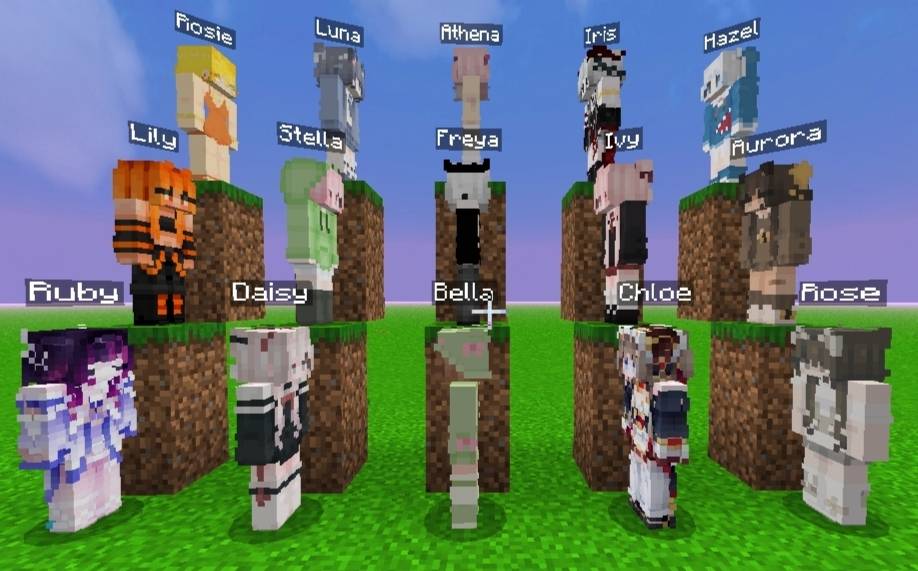
15 companions for Minecraft Bedrock. Recruit unique teammates to fight mobs, mine resources, store loot and XP, manage gear, and teleport instantly. No dependencies—just drop in...

Read the author’s full description (507 words)

Written by ApexStudio for the MCPEDL post, shown as published.

Apex: Companion

Your world. Your companions. Your adventure.

Survival is better with someone by your side. Apex: Companion brings 15 named humanoid companions to Minecraft Bedrock Edition, each with a unique appearance. Take them into combat, send them on resource-gathering expeditions, equip them with gear, and manage their abilities through an interactive in-game menu.

✦ Features

  • 👥 15 Unique Companions: Choose from 15 named characters with distinct skins and appearances. Switch between companions whenever you want to change who you're commanding.
  • ⚔️ Combat Support: Enable or disable combat to suit your playstyle. Your active companion can help you fight hostile mobs and provide support during dangerous encounters.
  • ⛏️ Resource-Gathering Expeditions
    Send your companion to gather resources without having to watch them mine every block. Choose from three expedition types:
  • Timber & Logs — gather wood and logs.
  • Ores & Minerals — collect mining resources.
  • Food & Provisions — gather food supplies.
  • Select the resources you want, start an expedition, and let your companion work while you continue your adventure. Larger selections can take longer, and resource rewards vary by item.
  • 📦 Stored Resources & XP: Your companion stores gathered items and accumulated experience for you to claim later. Collect everything at once, withdraw specific items, or claim stored XP when you need it.
  • 🛡️ Equipment & Tools: Manage your companion's equipment through the in-game interface. Give or swap gear, equip weapons and armor, assign tools for gathering, and use the auto-equip option to help manage their loadout.
  • ❤️ Medical & Combat Support: Access additional support options to help your companion assist you during combat and survival.
  • 🔄 Switch Companion: This let's you switch between multiple companions seamlessly.
  • ✨ Teleportation Options: Choose whether to teleport your companion to you or travel to your companion, making it easier to regroup and get back into the action.

🎮 Interactive Companion Menu

Manage your companion's behavior and settings from a dedicated interface, including:

  1. Follow and stay behavior
  2. Combat toggle
  3. Resource gathering
  4. Stored resources and XP
  5. Equipment and tools
  6.  Medical and combat support
  7. Appearance and identity
  8. Active companion selection
  9. Teleportation options

🌟 Extra and Taming:

Taming: Use Rose, Wither Rose, Poppy, Dandelion or Lily to tame her.

🥚 Memory Egg: When she dies, she drops a memory egg with all her data stored so you can respawn her again.

📊 Stats: Hold the heart to show a stats board on the right hand side.

🌿 Spawn:Make her spawn egg, by placing a dandelion in the middle of a crafting table.

🌍 Built for Survival

Apex: Companion is designed to bring several useful systems together in one add-on. Instead of being limited to a simple follower, you can manage combat support, resource expeditions, equipment, stored rewards, and movement from one place. Resource gathering also respects dimension restrictions, so dimension-specific resources cannot simply be collected from anywhere.

💜 About Apex Studio 💜

Apex: Companion is created by Apex Studio with the goal of making companion gameplay more useful, flexible, and enjoyable.

Thank you for checking out the add-on! If you enjoy it, consider leaving feedback or reporting issues so future updates can make the experience even better.

Bring your companions along and make your next survival adventure your own.

What’s new in the latest update

The author’s notes for the file uploaded .

Apex: Companion — V1.0.0 Initial Release

  • Added 15 unique humanoid companions with individual names and skins.
  • Introduced combat support and follow/stay controls.
  • Added resource-gathering expeditions for timber, ores, and food.
  • Implemented persistent storage for gathered items and XP.
  • Added companion equipment, armor, weapon, and tool management.
  • Introduced teleportation and active companion switching.
  • Added medical and combat support options.
  • Implemented dimension-based resource restrictions.
  • Added an interactive companion management interface.

How to install

  1. Download the file below. On iOS or Android, open it from your Downloads with Minecraft; on Windows, double-click it.
  2. Minecraft imports the pack automatically. Enable it in your world’s settings under Behavior Packs or Resource Packs; an add-on usually needs both.
  3. Playing on a Realm or server? Everyone needs the same packs, and the host has to enable them.
  4. Starting a new world? Choose its seed first: the Seed Map shows villages, structures and biomes near spawn for any Bedrock seed.