All texture packs
Better Inventory Overhauled
BedrockTexture packOtherby Bruhh69
About this texture pack
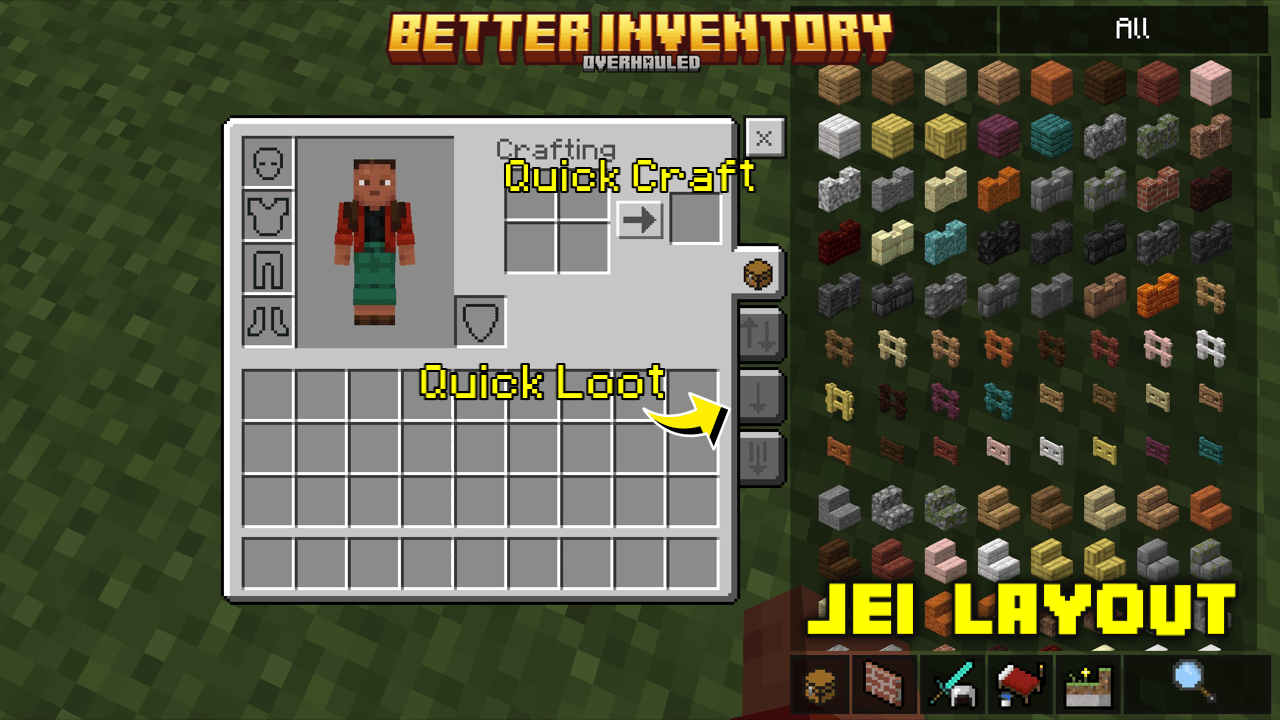
Are you having trouble organizing your inventory Or when you want to move items from inventory to chest? You need to try this pack!With quick loot, You will no longer have diffi...
Read the author’s full description (122 words)
Written by Bruhh69 for the MCPEDL post, shown as published.
Images
- Default mode (chest icon)
- Quick loot mode (up and down arrow icon)
- Drop one mode (arrow down icon)
- Drop all mode (multi arrow down icon)
- Jei layout
- Bundle item count
- Item Hover text tooltipsq
- Inventory shortcut, grey represents as player inventory, yellow represents as hotbar
- Quick craft (also works on crafting table)
- Crafting table
- Transparent variant of Jei
- Bundle item count
- Item Hover text tooltips
Configurations (_global_variables.json)
- $use_jei_layout = true is default, change it to false to disable the Jei layout and use default Minecraft layout
- $transparent_jei = true is default, change it to false to use the non transparent variant
- $item_hover_text_position = bottom_right (default), bottom_left, top_left, top_right
Credits
- TheAndromedarius (https://mcpedl.com/user/the-andromedarius) - Quick Loot Template, better villager container bindings template.
- ZackyProYT (https://m.youtube.com/@zackyproyt) - inventory navigation button
What’s new in the latest update
The author’s notes for the file uploaded .
Changes:
- used bedrockui+ item Hover text for smoother item move
- Added config to change item Hover text position custom
- Resized quick mode button and added Hover text
How to install
- Download the file below. On iOS or Android, open it from your Downloads with Minecraft; on Windows, double-click it.
- Minecraft imports the pack automatically. Enable it in your world’s settings under Behavior Packs or Resource Packs; an add-on usually needs both.
- Playing on a Realm or server? Everyone needs the same packs, and the host has to enable them.
- Starting a new world? Choose its seed first: the Seed Map shows villages, structures and biomes near spawn for any Bedrock seed.
Advertisement
More texture packs
- Texture packs
Clear Glass | Clear And Connected Glass | RTX & Non-RTX Supported
by Mod MCPE
- Downloads
- 669K
- Rating
- 5.0