All texture packs
Dark Mode UI
BedrockTexture packUtilityby Creep Cat
About this texture pack
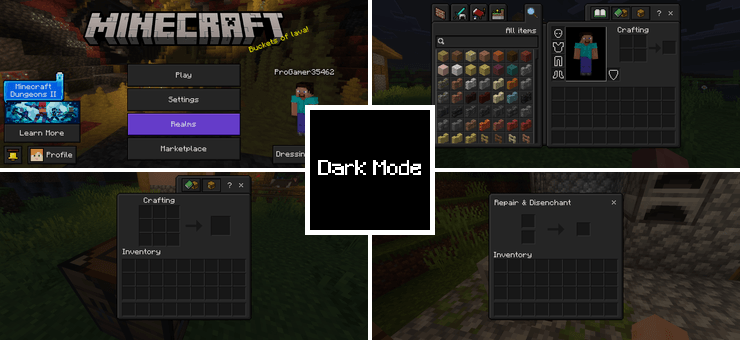
Dark Mode gives Minecraft's entire UI a sleek dark theme. Menus, inventory, crafting screens and all interface elements get a clean dark look that's easier on the eyes during lo...
Read the author’s full description (259 words)
Written by Creep Cat for the MCPEDL post, shown as published.
Dark Mode transforms Minecraft's entire interface into a sleek, eye-friendly dark theme. From main menus to inventories and crafting grids, every UI screen gets a clean, modern makeover that’s gentle on the eyes.
Includes 2 Subpacks:
- Dark: A balanced, classic dark style for clean visibility.
- Extra Dark: Deeper, rich dark tones for maximum contrast and zero eye strain.
Choose whichever mode fits your style best!
EXPLORE MY OTHER PROJECTS
Fully Grown Crop MarkerAdds a shine effect to fully grown crops so you can spot harvest-ready crops instantly. No Particles - No Lag
Removes all particles to cut visual clutter and boost performance. Hydra Visuals
Vivid blue skies, warm sunset glow and clean village lighting. Connected Hotbar
Removes the dividers between hotbar slots for one clean, unbroken bar. Full Grass | Fast Grass
Full green grass on every side of grass blocks, with no dirt strip. Dark Mode UI
A sleek dark theme for menus, inventory and crafting screens. Arvix Visuals
Rich green foliage, soft pink and purple sunset skies and crisp clouds. Re-fined crops
A cleaner look for carrots, potatoes, beetroot, wheat and more. Animated Totem Of Undying
Makes your Totem of Undying blink when held in hand. Colorful World
Re-saturates every default texture, with four strength levels. Breeze Visuals
Soft pastel skies, clear water reflections and a calm village atmosphere. Lower Fire For Pvp
Shrinks the on-screen fire so you can see your opponent while burning. Glass Door & Trapdoors
Replaces wooden doors and trapdoors with see-through glass versions. Pattern Beds
Adds decorative pattern designs to all bed textures.
Images
What’s new in the latest update
The author’s notes for the file uploaded .
Minor tweaks in contrast and brightness
How to install
- Download the file below. On iOS or Android, open it from your Downloads with Minecraft; on Windows, double-click it.
- Minecraft imports the pack automatically. Enable it in your world’s settings under Behavior Packs or Resource Packs; an add-on usually needs both.
- Playing on a Realm or server? Everyone needs the same packs, and the host has to enable them.
- Starting a new world? Choose its seed first: the Seed Map shows villages, structures and biomes near spawn for any Bedrock seed.
Advertisement