Display Player & Mob Health
BedrockScriptPlayersby DouarMC
About this script
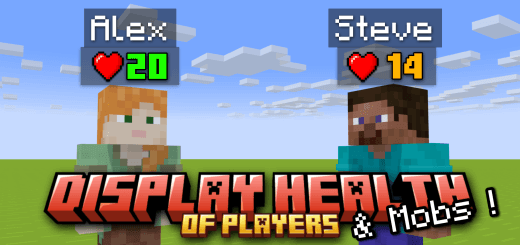
This addon/script will allow you to display the health of all the players and all mobs ! Thanks to Script API, we can access to the health of the Players & Mobs ! (Don't forget ...
Read the author’s full description (93 words)
Written by DouarMC for the MCPEDL post, shown as published.
The health of the players is displayed below the name of them. This is very useful ! You have not to do anything. This script will add a new line under the username of players, with their current health and their maximum health !
And the health of the entities is also displayed :
If a player/entity has the absorption effect, his current health will be displayed in yellow :
If a player/entity has the regeneration effect, his HP amount will be displayed in pink :
You can set the health visibility of entities with /displayhealth command !
Images
What’s new in the latest update
The author’s notes for the file uploaded .
Changelog v1.1.1 :
- New Floating Text System: Entity health is now displayed as a separate Floating Text above each creature instead of modifying the entity's nametag. This prevents visual conflicts and allows you to see both custom names and health points simultaneously.
- Performance Enhancements: The script has been heavily optimized and refactored to reduce CPU usage. This significantly cuts down on lag and ensures a much smoother gameplay experience on mobile devices and lower-end platforms.
- Version Requirement Update: Due to the new scripting methods used, this add-on now officially requires version 1.26.30 or higher to function properly. Please make sure your game is updated to prevent any script crashes.
How to install
- Download the file below. On iOS or Android, open it from your Downloads with Minecraft; on Windows, double-click it.
- Minecraft imports the pack automatically. Enable it in your world’s settings under Behavior Packs or Resource Packs; an add-on usually needs both.
- Playing on a Realm or server? Everyone needs the same packs, and the host has to enable them.
- Starting a new world? Choose its seed first: the Seed Map shows villages, structures and biomes near spawn for any Bedrock seed.
Advertisement