Skip to content
All add-ons

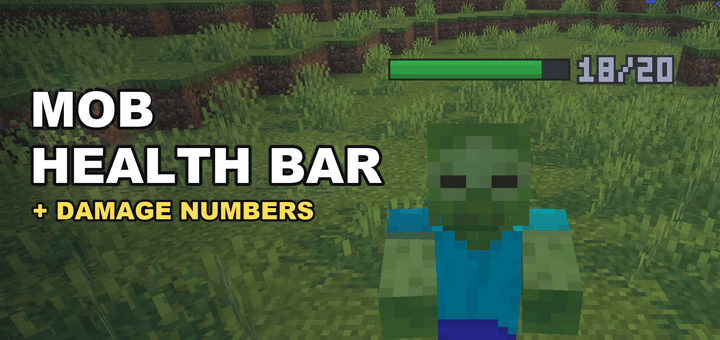
Mob Health Bar & Damage Numbers

BedrockAdd-onSurvival

by kazu1212

Mob Health Bar & Damage Numbers screenshot 1 of 7

About this add-on

HP bar above every nearby mob with exact health, floating damage numbers and green healing numbers. A clean health and damage indicator, fully configurable.

Read the author’s full description (358 words)

Written by kazu1212.

Mob Health Bar & Damage Numbers

See how much health every mob has! A clean health bar floats above every nearby mob, the exact HP sits next to it, and damage numbers pop out every time something gets hurt.

❤️ What it does

  • A bar above every nearby mob, no aiming needed. Green → yellow → red as health drops.
  • Exact HP next to the bar, like 14/20.
  • Floating damage numbers for any damage: sword, bow, fire, fall and more.

✨ Features

  • Smooth – the bar follows walking mobs and stays with them during knockback.
  • Fair play – invisible mobs and players never show a bar, so nothing is revealed.
  • Leaves nothing behind – particles only. No name tags changed, no entities added. Remove it any time.
  • English & Japanese

⚙️ Settings

Gear icon of Mob Health Bar in the Behavior Packs list (Edit World, or Settings in game):

  • Show health bars · health numbers · damage numbers
  • Display range (8 to 32 blocks)
  • Only show damaged mobs · also show on other players

Changes apply within about a second. Settings are saved per world.

🔗 Better together

  • Mob Levels – the level is shown right next to each health bar.
  • Mobs Drop OP Loot – check how tough a mob is before you fight it. Stronger mobs drop better loot.
  • OP Gear Upgrader – see exactly how much harder your upgraded gear hits.

✅ Compatibility

  • No experimental features required
  • Minecraft Bedrock 1.26.30 or later (tested on 26.52, Windows)
  • Single player and multiplayer
  • Doesn't replace any vanilla entity, item or UI

Install: open the .mcaddon file, then activate Mob Health Bar under Behavior Packs (the Resource Pack is added automatically). Updating: remove the old version in your world settings and activate the new one.

Good to know

  • Numbers show within 12 blocks; values above 999 show as 999.
  • Up to 24 nearest mobs show a bar, plus 8 more damaged mobs and 8 other players.
  • Damage you take yourself is not shown. Armor stands and the mob you ride show no bar.

Feel free to use this add-on in videos and streams (a link is appreciated). Re-uploading to other sites is not allowed. Bug reports: please leave a comment with your Minecraft version and device.

Images


What’s new in the latest update

The author’s notes for the file uploaded .

v1.1.0 - Healing numbers: a green +number pops up when a mob heals. Can be turned off in the settings.

How to install

  1. Download the file below. On iOS or Android, open it from your Downloads with Minecraft; on Windows, double-click it.
  2. Minecraft imports the pack automatically. Enable it in your world’s settings under Behavior Packs or Resource Packs; an add-on usually needs both.
  3. Playing on a Realm or server? Everyone needs the same packs, and the host has to enable them.
  4. Starting a new world? Choose its seed first: the Seed Map shows villages, structures and biomes near spawn for any Bedrock seed.