Player Stats System (Achivement Friendly)
BedrockScriptOtherby StevePlays2007
About this script
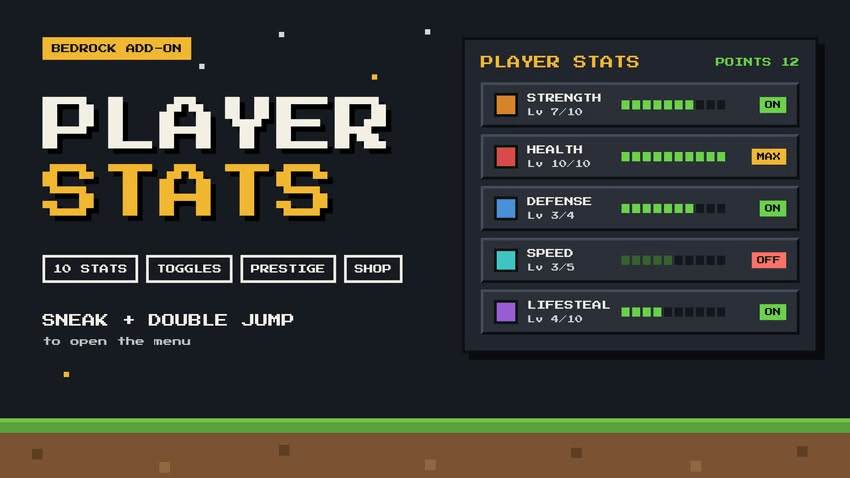
Sneak and double-jump to open an RPG-style stats menu. Spend points on Strength, Health, Regeneration, Lifesteal and more, turn any stat on or off, prestige for higher max level...
Read the author’s full description (225 words)
Written by StevePlays2007 for the MCPEDL post, shown as published.
PLAYER STATS MENU
Adds an RPG-style stats menu to Minecraft. Sneak and tap jump twice quickly to open it, then spend points to get stronger.
HOW POINTS WORK
You start with 5 Stat Points.
Every kill gives 1 more.
Bosses give much more: Ender Dragon 50, Wither 30, Warden 25, Elder Guardian 10.
STATS
Strength: hit harder
Health: extra hearts
Defense: take less damage
Regeneration: heal over time
Lifesteal: heal when you hit enemies
Speed, Jump and Mining (dig faster)
Fire Resistance and Water Breathing are perks you unlock once for 3 points
Tap a stat to upgrade it one level at a time, or use Upgrade MAX to spend everything on it.
TURN STATS ON AND OFF
Don't want Speed? Turn it off, and turn it back on whenever you like. Your levels are kept.
PRESTIGE
Max out every stat, then prestige to raise the max level of Strength, Health, Speed and Mining. You can prestige 5 times, and each rank costs more points (10, 20, 30, 40, 50).
POINTS SHOP
Spend leftover points on Full Heal, Night Vision, Golden Apples, Ender Pearls, XP levels, Diamonds, Enchanted Golden Apples, Totems of Undying or Netherite Ingots.
ALSO
Stats are saved per player, so they work in multiplayer and stay after you die.
Reset anytime and get all your points back (your Prestige rank is kept).
How to install
- Download the file below. On iOS or Android, open it from your Downloads with Minecraft; on Windows, double-click it.
- Minecraft imports the pack automatically. Enable it in your world’s settings under Behavior Packs or Resource Packs; an add-on usually needs both.
- Playing on a Realm or server? Everyone needs the same packs, and the host has to enable them.
- Starting a new world? Choose its seed first: the Seed Map shows villages, structures and biomes near spawn for any Bedrock seed.
Advertisement