Skip to content
All add-ons

Travelers Backpack

BedrockAdd-onSurvival

by voxenMC2

Travelers Backpack screenshot 1 of 12

About this add-on

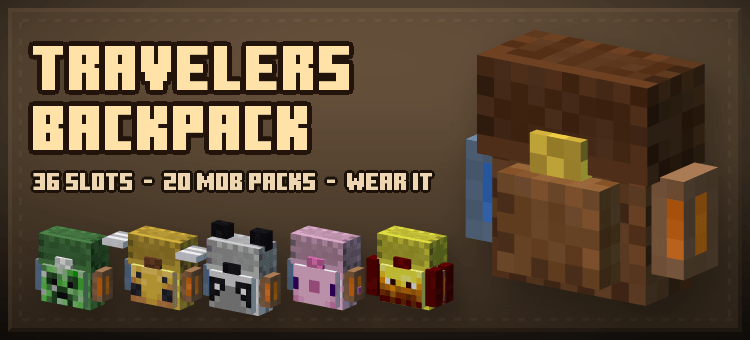
Travelers Backpack for Bedrock: a wearable 36-slot pack you place, open and carry. Your tools ride on the back, water and lava tanks come along, and 20 mob backpacks each open t...

Read the author’s full description (219 words)

Written by voxenMC2 for the MCPEDL post, shown as published.

A backpack you actually wear. Carry one and it shows on your back, with the tools you are carrying strapped to it. Put it down and it becomes a real block you can open, break and take away again — contents and all.

What it does

  • 36 slots that travel with you. Place the backpack, aim at its upper half and open it. Break it and everything inside comes with it.
  • Every pack has its own storage. Two backpacks never share an inventory, even if you copy one in creative.
  • Your gear rides on the back. Sword, pickaxe, axe, bow, shield, torch, lantern, totem, potion, food and raw ores — 40 pieces in all, every one drawn with Minecraft's own textures, in real 3D.
  • Water and lava tanks. Four buckets of each, filled and poured straight from the backpack menu.
  • 20 mob backpacks. Creeper, enderman, zombie, skeleton, spider, wolf, fox, cat, pig, cow, sheep, chicken, bee, blaze, ghast, slime, villager, iron golem, panda and axolotl — each dyed in that mob's own colours, wearing that mob's own face, with ears, horns, wings, legs or tentacles of its own.
  • A screen themed to the bag you opened. Every backpack has its own container screen, mixed from the same colours the bag is dyed with, with that mob's face in the title bar.

Crafting:

What’s new in the latest update

The author’s notes for the file uploaded .

  • Filling glass bottles from the water tank now shows the water level on screen, just like buckets do
  • Picking up a backpack now tells you how many slots are used (for example: 12/54 slots used)
  • Compatible with latest version

Video

The video the creator embedded in this add-on's MCPEDL post. VoxenMC2 on YouTube

How to install

  1. Download the file below. On iOS or Android, open it from your Downloads with Minecraft; on Windows, double-click it.
  2. Minecraft imports the pack automatically. Enable it in your world’s settings under Behavior Packs or Resource Packs; an add-on usually needs both.
  3. Playing on a Realm or server? Everyone needs the same packs, and the host has to enable them.
  4. Starting a new world? Choose its seed first: the Seed Map shows villages, structures and biomes near spawn for any Bedrock seed.