Upgrade Item(Achievements Friendly)
BedrockAdd-onMultiplayerby YTAUN
About this add-on
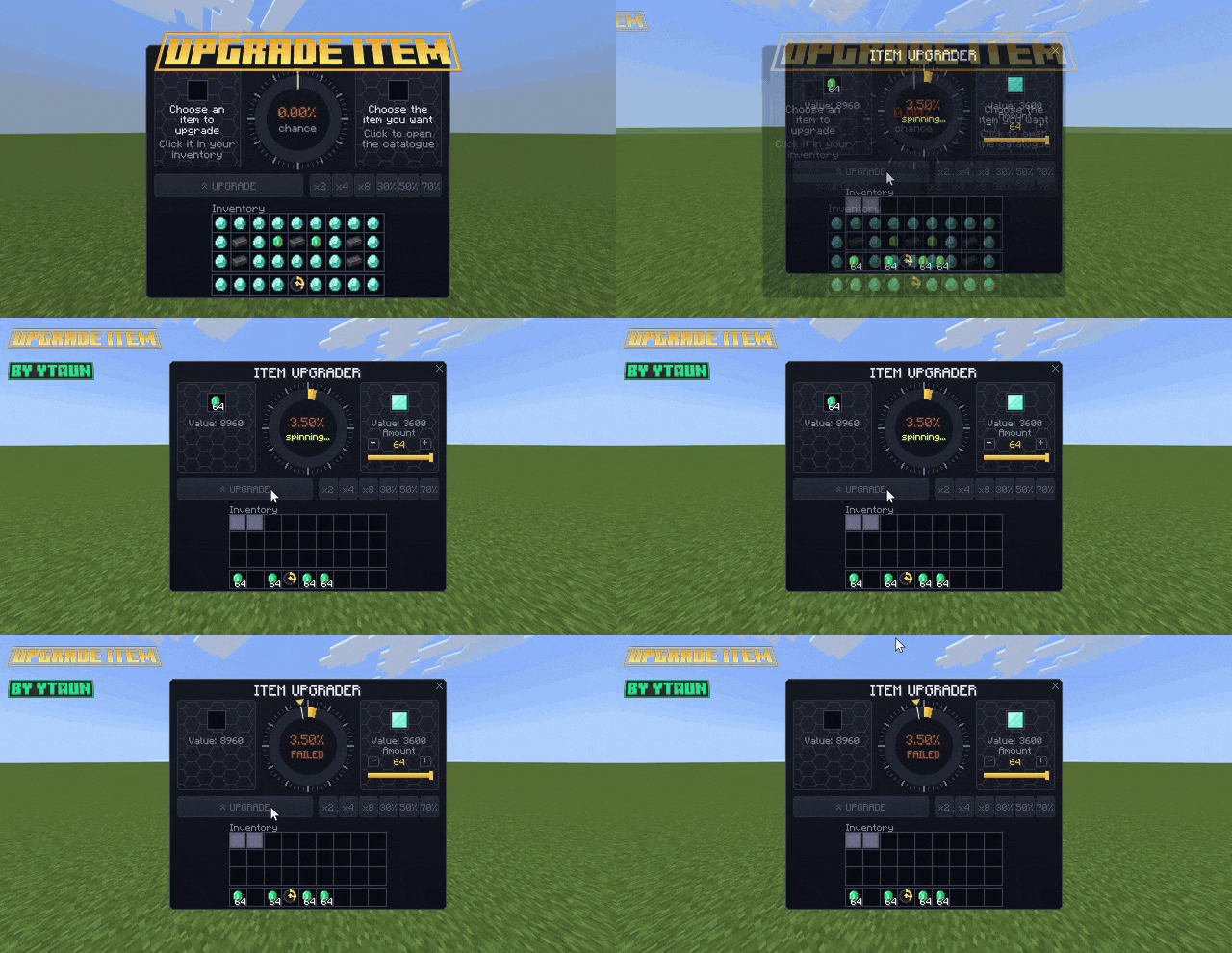
Bet an item for a chance to upgrade it into something better! Lucky wheel, custom UI like the Upgrader mod, win odds based on each item's real value. No experiments needed.
Read the author’s full description (970 words)
Written by YTAUN.
Got a stack of diamonds and feeling lucky enough to try for a netherite block? Upgrader lets you bet an item for a chance to turn it into any item you choose. Win and your item becomes the one you picked. Lose and it's gone. The more you bet, the better your odds.
This add-on was written from scratch for Bedrock: Script API, a hand-built JSON UI, redrawn textures, no experiments needed. The gameplay and design are based on the Upgrader mod (Fabric, Java) by EXEcheINZ.
UPDATE 1.7:
- Custom items from other add-ons (added in 1.5, much improved): every item and block from your other add-ons is found automatically. You can bet it and pick it, with no setup.
- Prices are worked out for you from durability, food value, tags and stack size. Weapons, armor and rare materials never end up priced like dirt.
- Set a price yourself: valueOverrides in the config, the item tag upgrader:value_250, or /scriptevent upgrader:price myaddon:ruby 250. Other add-ons can send that command from their own scripts.
- Check a price in game: /scriptevent upgrader:value (item in hand) or /scriptevent upgrader:value myaddon:ruby.
- Hide an item: the tag upgrader:blacklist, or /scriptevent upgrader:blacklist myaddon:ruby.
- Icons: set the exact texture with customItems.icons in the config or /scriptevent upgrader:icon myaddon:ruby textures/items/ruby.
- Admin prize menu: run /upgrader:admin (operators only, close the chat to see it) to open a grid like the catalogue. Tap an item to remove it from the prizes, tap it again to allow it. Tap the search bar to search, type banned to list removed items. Removed items can still be used as the bet. The list is saved in the world. Also: /scriptevent upgrader:ban (item in hand) and /scriptevent upgrader:unban_all.
- Quick-pick buttons now hit their number: x2 / x4 / x8 and 30% / 50% / 70% pick the item and the amount that gets closest to the target, so 50% really shows about 50%.
- Fairer item values: about 300 vanilla items that had no recipe and were stuck at a tiny default now have proper prices: filled buckets, mob heads, chainmail and horse armor, mace, coral, concrete, weathered copper, sculk, froglights and more.
✨ Features
- Custom interface: an ITEM UPGRADER panel with a card for your bet, a card for the item you want, the wheel in the middle and your inventory below. It is not the default list-of-buttons form.
- Lucky wheel:
- The golden part of the wheel is the winning zone, sized by your chance.
- The needle spins 5 times, then slows down over 3.5 seconds, with ticking that starts fast and gets slower.
- Landing in the golden zone shows SUCCESS!; anywhere else shows FAILED. Players nearby hear the result sound too.
- Catalogue of almost 1,500 items plus every custom item from your other add-ons: sorted from cheapest to most expensive, with a search box and scroll buttons. Hover over an item to see its name, value and estimated chance.
- Quick-pick buttons:
- x2 / x4 / x8: picks the item and amount worth closest to 2, 4 or 8 times your bet.
- 30% / 50% / 70%: picks the item and amount that give the chance closest to that number.
- Choose amounts: use - / , click on the bar, or click the number to open a slider.
- Item values:
- Some items have fixed base values: dirt 1, iron 40, gold 60, diamond 400, nether star 4000…
- Values spread through every crafting, smelting, stonecutter and smithing recipe.
- Ores are worth at least what they drop when mined with a Fortune III pickaxe.
- Damaged tools and armor lose value as they wear down.
- Fair odds:
- Chance = 0.9 × value of your bet ÷ value of the item you want, kept between 0.1% and 90%.
- The result is decided the moment you press UPGRADE.
- Safe: if you leave the game or disconnect mid-spin, your prize is kept and given to you when you rejoin.
- Blacklist: bedrock, barriers, command blocks, spawners, spawn eggs and similar items can't be bet or picked. Admins can also remove any item from the prizes with /upgrader:admin.
- Languages: English and Russian.
🔨 Getting the Upgrader
- Craft it at a crafting table: Gold Diamond Gold Diamond Anvil Diamond Gold Diamond Gold
- Command: /give @s upgrader:upgrader
- Creative: Items tab.
🎮 How to use
- Hold the Upgrader and right-click (on mobile: tap the screen) to open the panel.
- Click an item in your inventory to place it in the bet slot.
- Click the right slot to open the catalogue and pick the item you want, or use the x2 / 50%… buttons.
- Adjust the amounts if you like, then press UPGRADE and watch the wheel.
⚙️ Configuration
Edit scripts/config.js in the Behavior Pack, then run /reload.
- Odds: houseEdge, minChance, maxChance
- Spin time: spinDurationTicks
- Values: valueOverrides (fixed prices for single items, including items from other add-ons), globalValueMultiplier, valueMultipliers
- Other add-ons: customItems (enabled, autoPrice, autoMultiplier, minValue, maxValue, iconGuess, icons, allowNamespaces, denyNamespaces)
- blacklist, maxTargetCount
- Spin limits: attemptLimit, attemptWindowSeconds
📋 Requirements
- Minecraft Bedrock 1.21.100 or newer.
- No Experiments / Beta APIs needed.
- Turn on the Behavior Pack; the Resource Pack is added with it.
ℹ️ Notes
- Because of how Bedrock forms work, the panel has to reload each time you press a button. The spin itself plays without reloading, and the result stays on the panel until your next click.
- The Resource Pack turns off the slide animation when dialogs open and close, so the panel doesn't flicker. This applies to every dialog while the pack is on.
- Catalogue search uses English item names or item IDs.
- Custom items show their icon from textures/items/<item name> by default. If an item's texture file has a different name, set its icon with customItems.icons or /scriptevent upgrader:icon.
- /upgrader:admin needs operator permission; /scriptevent upgrader:admin also works for players with the tag upgrader_admin.
👏 Credits
- Bedrock version by YTAUN. All code, the JSON UI and the textures were made new for Bedrock.
- Based on the Upgrader mod (Fabric) by EXEcheINZ: gameplay, interface design and value system.
Video
How to install
- Download the file below. On iOS or Android, open it from your Downloads with Minecraft; on Windows, double-click it.
- Minecraft imports the pack automatically. Enable it in your world’s settings under Behavior Packs or Resource Packs; an add-on usually needs both.
- Playing on a Realm or server? Everyone needs the same packs, and the host has to enable them.
- Starting a new world? Choose its seed first: the Seed Map shows villages, structures and biomes near spawn for any Bedrock seed.
Advertisement
More add-ons
- Add-ons
SERP PokeDrock SMP POKEFUN – Multiplayer Server Connect addon
by BOYS MSG 01
- Downloads
- 128K
- Rating
- 4.4