Waypoint Guide V1 (Achivement Friendly)
BedrockScriptSurvivalby StevePlays2007
About this script
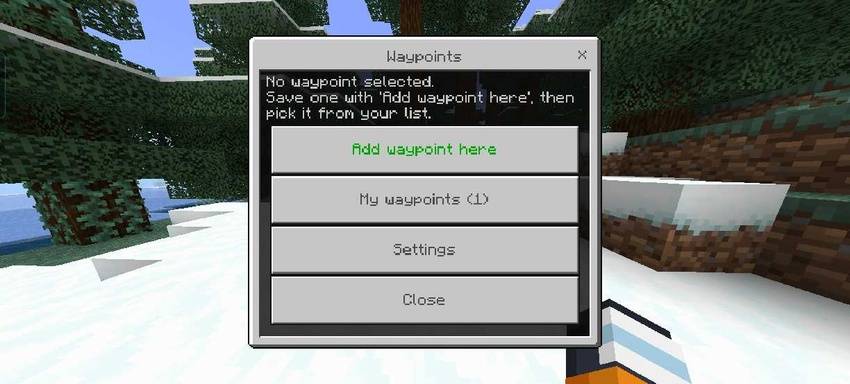
Never Get Lost Again A lightweight navigation addon for Bedrock. Sneak + Double Jump to open the waypoint menu, set your destination, and follow a personal arrow + particle tra...
Read the author’s full description (168 words)
Written by StevePlays2007.
Tired of getting lost or spamming coordinates in chat?
Waypoint Guide V1 adds a clean, modern waypoint system to Minecraft Bedrock without breaking immersion.
How it works:
1. Sneak Double Jump to open the Waypoint Menu 2. Create, save, and manage up to 40 waypoints 3. Select a waypoint to activate guidance 4. Follow the floating arrow and trail to your destination
When you arrive (within 3 blocks), it auto-clears.
Features: • 100% Personal: Arrow, trail, and beam particles are visible only to you - no spam for other players on Realms/Servers • Visual Guidance System: ◦ Floating Arrow: Always points to your active waypoint, floating in front of your view ◦ Trail Dots: Particle path showing the next 28 blocks ahead ◦ Arrival Beam: Beacon-like beam appears when you're within 48 blocks • Smart HUD: Shows distance, direction glyphs [↑ ↗ → ↘], and dimension (Overworld / Nether / End) • Fully Persistent: Waypoints save with Dynamic Properties, so they stay after relog • Customizable: Edit settings in waypoint1.js - change colors, distances, max waypoints, particle type (minecraft:colored_flame_particle), and more • Multiplayer & Realm Friendly
What’s new in the latest update
The author’s notes for the file uploaded .
More polished than V1
How to install
- Download the file below. On iOS or Android, open it from your Downloads with Minecraft; on Windows, double-click it.
- Minecraft imports the pack automatically. Enable it in your world’s settings under Behavior Packs or Resource Packs; an add-on usually needs both.
- Playing on a Realm or server? Everyone needs the same packs, and the host has to enable them.
- Starting a new world? Choose its seed first: the Seed Map shows villages, structures and biomes near spawn for any Bedrock seed.
Advertisement