Albedo UI | Anime | Animated Menu | Anime Girl | Anime UI | Girl | Menu | Overlord
BedrockTexture packOtherby Blub Studios
About this texture pack
Albedo UI for Minecraft Bedrock and MCPE, inspired by Overlord. Features an Anime UI, Animated Menu, elegant black-white-gold styling, detailed Albedo artwork, custom GUI visual...
Read the author’s full description (1,343 words)
Written by Blub Studios.
Albedo UI | Anime | Animated Menu | Anime Girl | Anime UI | Girl | Menu | Overlord
Overlord Inspired Anime UI for Minecraft Bedrock & MCPE
Transform Minecraft Bedrock with Albedo UI, an Overlord inspired custom interface featuring an Anime UI, Animated Menu, elegant black-white-gold visuals, detailed Albedo artwork, dark fantasy GUI styling, and a beautifully themed loading screen.
Designed for players searching for an Albedo UI, Overlord UI, Anime UI, Animated Menu, Anime Girl UI, Minecraft Bedrock Anime UI, MCPE Anime UI, Dark Anime UI, or Custom Minecraft GUI, this pack gives Minecraft a luxurious character-focused identity while keeping navigation familiar and easy to use.
In-Game Screenshots
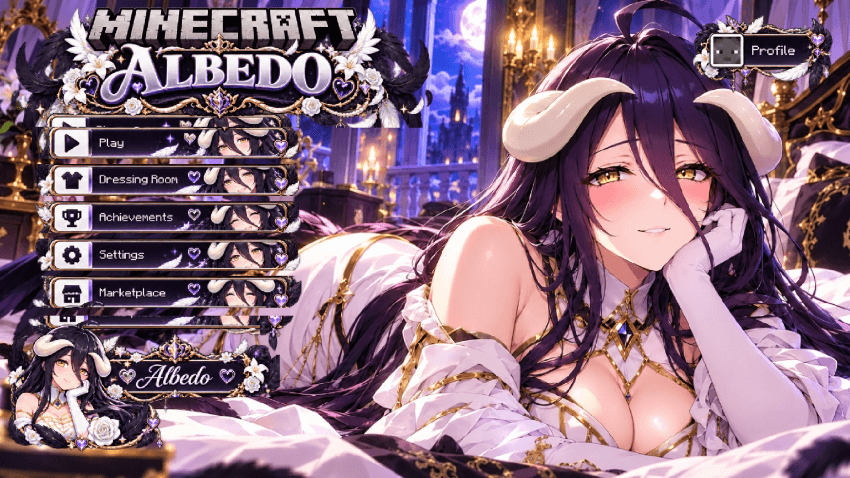
Albedo Main Menu Screenshot
Albedo Loading Screen Screenshot
An Overlord Inspired Anime UI for Minecraft
Bring the elegant and commanding presence of Albedo from Overlord into Minecraft Bedrock with a custom anime interface built around a luxurious dark fantasy aesthetic.
Albedo is one of the most recognizable characters from Overlord, known for her long dark hair, golden eyes, white-and-black appearance, distinctive horns, black wings, and refined visual identity.
This UI uses those recognizable traits as the foundation of the entire interface rather than relying on a generic anime background.
The result is an Albedo Minecraft UI that combines detailed character artwork, custom GUI elements, dark fantasy styling, ornate gold accents, white floral decoration, and violet highlights into one cohesive Overlord inspired experience.
Anime UI and Animated Menu Experience
The Animated Menu is one of the central highlights of Albedo UI.
Instead of opening Minecraft to the standard interface, the pack introduces a more atmospheric character-themed presentation with detailed Albedo artwork, elegant menu frames, white floral elements, dark interface panels, and gold ornamental details.
Albedo remains the main visual centerpiece while Minecraft navigation stays clearly positioned and easy to understand.
Detailed Albedo artwork, dark fantasy GUI styling, black-and-white contrast, gold decoration, violet accents, and an Anime Girl Animated Menu combine to create a distinctive Overlord Anime UI for Minecraft Bedrock.
Black, White, Gold & Violet Visual Theme
The visual direction of Albedo UI is built around a rich combination of black, white, gold, deep violet, lavender, and warm candlelight tones.
These colors closely complement Albedo's recognizable appearance and create an interface that feels elegant, dramatic, luxurious, and noticeably different from Minecraft's default menus.
White roses, black feathers, ornamental wings, gold trim, dark ribbons, heart details, and palace-like nighttime scenery reinforce the Overlord-inspired presentation while keeping the interface visually organized.
This gives the pack a strong identity for players looking for a dark Anime UI, black and gold Minecraft GUI, Overlord UI, Albedo theme, gothic Anime UI, or aesthetic Minecraft Bedrock interface.
Custom Albedo Interface Experience
- Albedo UI for Minecraft Bedrock & MCPE
- Overlord Inspired Anime UI
- Animated Menu
- Anime Girl interface presentation
- Custom Minecraft Bedrock GUI styling
- Detailed Albedo character artwork
- Black, white, gold, and violet visual theme
- Dark fantasy inspired decorative elements
- Character-themed main menu presentation
- Themed loading screen design
- Styled menu buttons and interface frames
- White rose and black wing inspired details
- Elegant palace-like nighttime atmosphere
- Clean and recognizable Minecraft navigation
Custom Albedo Loading Screen
The Albedo theme continues beyond the main menu with a dedicated anime-themed loading screen.
The loading interface carries forward the same dark fantasy visual identity with Albedo artwork, white floral decorations, black feather details, ornate gold framing, violet highlights, and a coordinated progress bar presentation.
Maintaining the same visual direction across the main menu and loading screen helps the pack feel like a complete Albedo UI rather than a single background replacement.
This consistency gives the interface a stronger identity from the moment Minecraft opens until the player enters a world.
Designed Around Albedo, Not a Generic Anime Theme
A strong character UI should immediately communicate which character inspired it.
Albedo UI uses her recognizable dark hair, golden eyes, horned silhouette, black wings, white clothing, gold accessories, and elegant dark fantasy aesthetic to establish a clear visual identity.
This makes the project especially relevant for players searching for Albedo UI, Albedo Minecraft UI, Overlord Minecraft UI, Overlord Anime UI, Anime Girl UI, Dark Fantasy UI, Gothic Anime UI, or Overlord themed Minecraft customization.
The character remains the visual centerpiece while the menu elements are designed to complement the artwork rather than compete with it.
Elegant Dark Fantasy Minecraft GUI
The visual presentation of Albedo UI is deliberately more refined than a simple character wallpaper.
Decorative borders, floral motifs, wing-inspired elements, dark menu backgrounds, gold ornamentation, and carefully coordinated character artwork help create a more complete custom GUI experience.
The contrast between dark purple and black elements against white roses and gold highlights gives the interface strong readability while preserving its luxurious aesthetic.
This makes the pack particularly suitable for players looking for an elegant Minecraft UI, gothic Minecraft interface, black and gold Anime UI, or dark character-themed GUI.
Clean GUI for Everyday Minecraft
A custom Minecraft interface needs to look distinctive while remaining practical for normal gameplay.
Albedo UI keeps the familiar Minecraft menu structure easy to understand while replacing the ordinary visual presentation with a more refined anime design.
Important navigation options remain clearly separated and readable, allowing the pack to work naturally for everyday Minecraft use rather than only screenshots or showcases.
Whether you are entering a Survival world, building in Creative, joining multiplayer, adjusting settings, browsing Marketplace content, recording videos, or taking screenshots, the Albedo theme remains part of the overall interface experience.
Minecraft Bedrock & MCPE Anime UI
Albedo UI is designed for players interested in a Minecraft Bedrock Anime UI or MCPE Anime UI with a strong character-specific identity.
It combines Albedo's recognizable Overlord design with popular interface customization features such as an Animated Menu, Anime Girl visuals, custom GUI styling, detailed character artwork, a themed loading screen, and an aesthetic Minecraft menu presentation.
The pack naturally fits searches related to Anime UI for Minecraft Bedrock, MCPE Anime UI, Minecraft Anime GUI, Minecraft Animated Menu, Custom Minecraft UI, Anime Girl UI, Albedo UI, Overlord UI, Albedo Minecraft, Overlord Minecraft UI, Dark Anime UI, and Gothic Minecraft UI.
Made for Overlord & Albedo Fans
This UI is designed for players who enjoy Overlord, Albedo, anime resource packs, custom Minecraft interfaces, animated menus, character-themed GUI packs, dark fantasy designs, and aesthetic Minecraft customization.
Its black, white, gold, and violet palette makes it especially suitable for players who prefer elegant, gothic, luxurious, or darker anime interfaces.
Albedo UI can also fit naturally into a larger Overlord themed Minecraft setup alongside compatible anime skies, inventory textures, bed textures, totem packs, PvP resources, visual packs, and other character-themed add-ons.
A Dark Fantasy Overlord Visual Identity
The moonlit palace environment, warm candlelight, black feathers, white flowers, dark purple atmosphere, and ornamental gold details give the interface a visual direction that strongly complements Albedo's Overlord identity.
Rather than relying only on character artwork, the surrounding environment and GUI styling help establish a wider fantasy atmosphere that makes the whole pack feel more cohesive.
This creates a stronger presentation for players looking for an Overlord inspired Minecraft UI, Albedo Anime UI, dark fantasy Minecraft GUI, gothic Anime UI, or character-themed Minecraft resource pack.
For Screenshots, Videos & Anime Minecraft Setups
The detailed character presentation and dramatic dark fantasy styling also make Albedo UI suitable for Minecraft videos, resource pack showcases, screenshots, Overlord themed gameplay setups, and anime Minecraft collections.
Opening Minecraft immediately presents a recognizable Albedo and Overlord inspired visual identity, helping character-themed setups feel more complete from the main menu onward.
Give Minecraft an Albedo Makeover
Replace the standard Minecraft menu presentation with a more elegant, darker, and more character-focused interface inspired by Albedo from Overlord.
If you are looking for an Albedo UI, Overlord UI, Anime UI, Animated Menu, Anime Girl UI, Minecraft Bedrock Anime UI, MCPE Anime UI, Dark Fantasy GUI, Gothic Anime UI, or character-themed Minecraft interface, this pack is designed around exactly that experience.
With detailed Albedo artwork, an Animated Menu, custom GUI styling, a coordinated loading screen, dramatic black-and-white visuals, violet accents, and elegant gold decoration, Albedo UI gives Minecraft Bedrock a fresh Overlord inspired identity.
ALBEDO UI | ANIME | ANIMATED MENU | OVERLORD
Minecraft Bedrock & MCPE
Blub Studio
How to install
- Download the file below. On iOS or Android, open it from your Downloads with Minecraft; on Windows, double-click it.
- Minecraft imports the pack automatically. Enable it in your world’s settings under Behavior Packs or Resource Packs; an add-on usually needs both.
- Playing on a Realm or server? Everyone needs the same packs, and the host has to enable them.
- Starting a new world? Choose its seed first: the Seed Map shows villages, structures and biomes near spawn for any Bedrock seed.
Advertisement