Simple Death Counter
BedrockScriptSurvivalby DouarMC
About this script
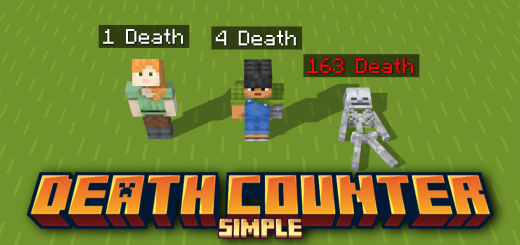
A Death Counter is very useful when you play on survival world with your friends, and watch who is your friend who have the most deaths. With this script, we will be able to wat...
Read the author’s full description (162 words)
Written by DouarMC.
This add-on provides a fully automatic Death Counter system for Minecraft Bedrock worlds.
It uses the built-in scoreboard to track the number of times each player dies and keeps that value even after players leave or when the world is reloaded.
How it works :
- Every time a player dies, 1 point is added to their personal death counter.
- By default the scoreboard is displayed in the Sidebar, but you can easily change the display slot to BelowName or List using standard Minecraft commands.
- The add-on automatically removes players from the visible scoreboard when they leave the game, while safely saving their score in the world so that it is restored when they rejoin.
You can also change the place where the scoreboard douarmc_simple_death_counter:death_counter will be displayed (Sidebar, Belowname, List).
Custom Commands :
You can use the /resetdeathscore command to reset the death scores for selected players.
You can use the /showdeathscore command to show the death scores of selected players in the chat.
What’s new in the latest update
The author’s notes for the file uploaded .
Changelog v1.1.1 :
- Minimum Version Requirement: Please note that version 26.40 is now strictly required for this addon to function, meaning older versions are no longer supported and you must update your core software to prevent compatibility issues or crashes.
- Code Architecture Optimization: A comprehensive refactoring of the internal script organization has been completed to clean up legacy code, which significantly improves overall performance, reduces resource overhead, and ensures better long-term stability.
How to install
- Download the file below. On iOS or Android, open it from your Downloads with Minecraft; on Windows, double-click it.
- Minecraft imports the pack automatically. Enable it in your world’s settings under Behavior Packs or Resource Packs; an add-on usually needs both.
- Playing on a Realm or server? Everyone needs the same packs, and the host has to enable them.
- Starting a new world? Choose its seed first: the Seed Map shows villages, structures and biomes near spawn for any Bedrock seed.
Advertisement