Durability Viewer
BedrockTexture packPvpby EchoRif
About this texture pack
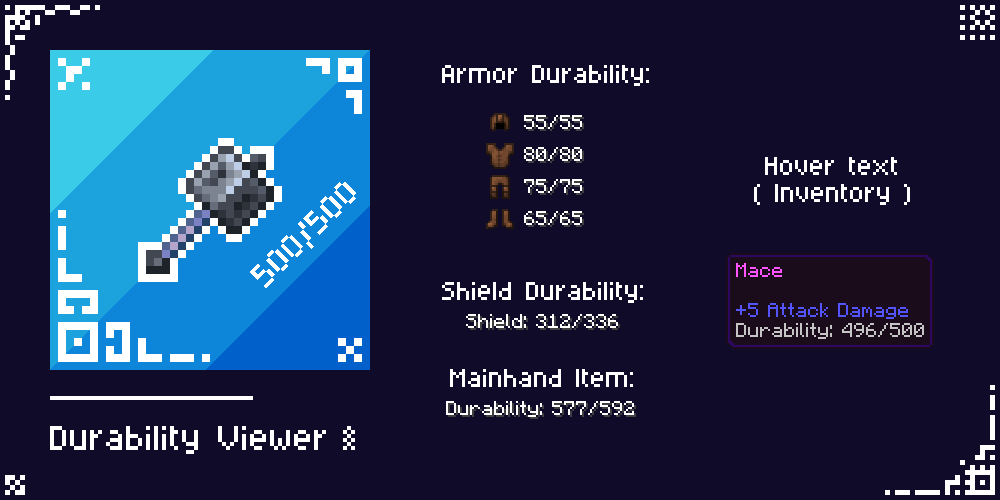
This resource pack displays tool durability directly on the HUD and inventory screens. When paired with the behavior pack, it also displays the durability of armor and shields.
Read the author’s full description (210 words)
Written by EchoRif for the MCPEDL post, shown as published.
Durability Viewer
This resource pack shows durability of a tool in the hotbar and container screens. When the behavior pack is applied, the shield durability and armor durability is shown as well on the HUD screen.
So, it's mainly a resource pack. The behavior pack is required only if you want armor and shield durability to be shown (Bottom left corner of HUD screen). Achievements friendly.
Features
- Mainhand Item Durability in HUD
- Item Durability in hover text of container screens (Inventory, Chest etc.)
- Blink Animation when durability goes below 20%
- Armor Durability in HUD [Requires Behavior Pack]
- Shield Durability in HUD [Requires Behavior Pack]
- Config Options [Through _global_variables.json File]
Usage:
- Download the RP file and activate in your world
- If you want to display Armor and Shield Durability, simply download and activate the BP file
Note: You can't use the behavior pack in servers. For PvP, use Utility HUD
Download Behavior Pack:
- CurseForge
- MCPEDL [File with BP in its name]
Config:
MCPEDL link - Durability Viewer
- You can modify the pack for your personal use only.
- You cannot use any code without permission or reupload the pack.
- If you find any bugs or have any suggestions for new features, feel free to contact me on Discord or join my Server!
Images
What’s new in the latest update
The author’s notes for the file uploaded .
- Added Armor and Offhand durability directly in Inventory for convenience.
- Fixed automatic hover on first slot on touch devices.
How to install
- Download the file below. On iOS or Android, open it from your Downloads with Minecraft; on Windows, double-click it.
- Minecraft imports the pack automatically. Enable it in your world’s settings under Behavior Packs or Resource Packs; an add-on usually needs both.
- Playing on a Realm or server? Everyone needs the same packs, and the host has to enable them.
Advertisement