F1 & F3 BUTTON - Windows Update
BedrockTexture packPvpby NeBux
About this texture pack
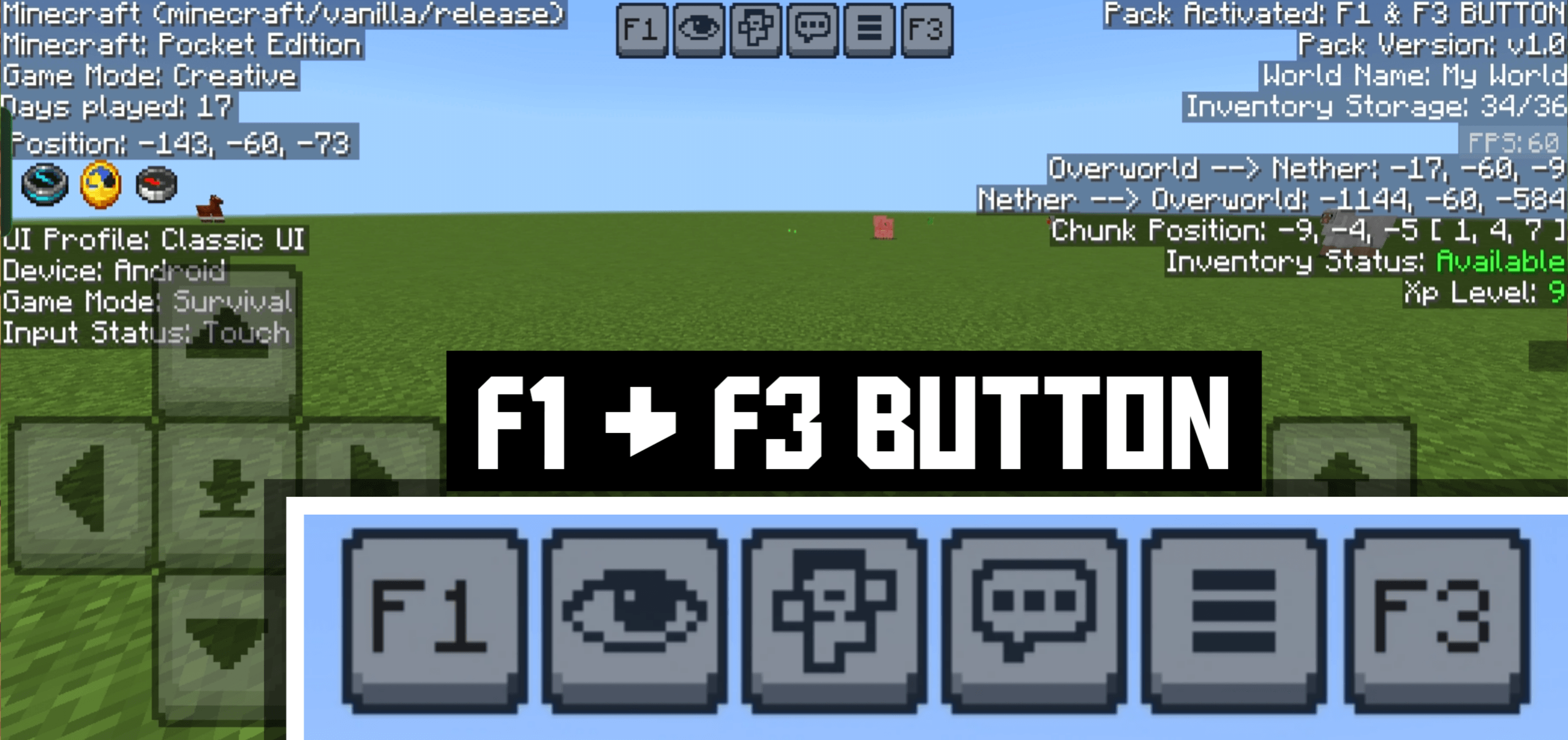
This pack adds F1 & F3 Button to Minecraft Bedrock / Pocket Edition. F3 shows a Java-like debug screen with coords, FPS, chunks, and more, while F1 hides the HUD for clean scree...
Read the author’s full description (145 words)
Written by NeBux for the MCPEDL post, shown as published.
F1 & F3 BUTTON
This resource pack adds Java Edition-like F1 & F3 Buttons to Minecraft Bedrock / Pocket Edition.
With F3, you can instantly view all important game information with a clean black background overlay for better readability.
With F1, you can hide the entire HUD (hand, hotbar, chat, buttons, etc.) for a clean screen experience — perfect for screenshots or cinematic gameplay.
✨ Both features are standalone and are also available in my NeBux UI Pack.
Features:
- 📍 Position (XYZ Coordinates)
- ⏳ Days Played
- 📦 Inventory Counter (used/total slots)
- ✅ Inventory Status (Available / Full)
- ⚔️ Game Mode Info
- 📲 Device & Input Status
- 🎮 UI Profile (Classic / Pocket)
- 🔄 Dimension Info (Overworld ↔ Nether conversion)
- 🧭 Chunk Position
- 🎚️ XP Level Display
- 🎞️ FPS Counter
- 🧾 Pack Information (Pack version, world details)
- 👁️ Toggle HUD (F1 Button) — hide/show HUD instantly
If you enjoy my packs and want to support my work
❤️ Support Me on Ko-fi
Your support means a lot — thank you!
Images
What’s new in the latest update
The author’s notes for the file uploaded .
- Updated for latest version
How to install
- Download the file below. On iOS or Android, open it from your Downloads with Minecraft; on Windows, double-click it.
- Minecraft imports the pack automatically. Enable it in your world’s settings under Behavior Packs or Resource Packs; an add-on usually needs both.
- Playing on a Realm or server? Everyone needs the same packs, and the host has to enable them.
Advertisement