Fast Craft & Fast loot Texture pack | Quick Craft & Quick Loot!
BedrockAdd-onPvpby Mod MCPE
About this add-on
This resource pack does works just as named. It saves your a lot of time crafting multiple items quickly, that also on both PC and Mobile, Or Both in Classic Ui And Pocket UI.
Read the author’s full description (361 words)
Written by Mod MCPE for the MCPEDL post, shown as published.
Get started with Godlike click here
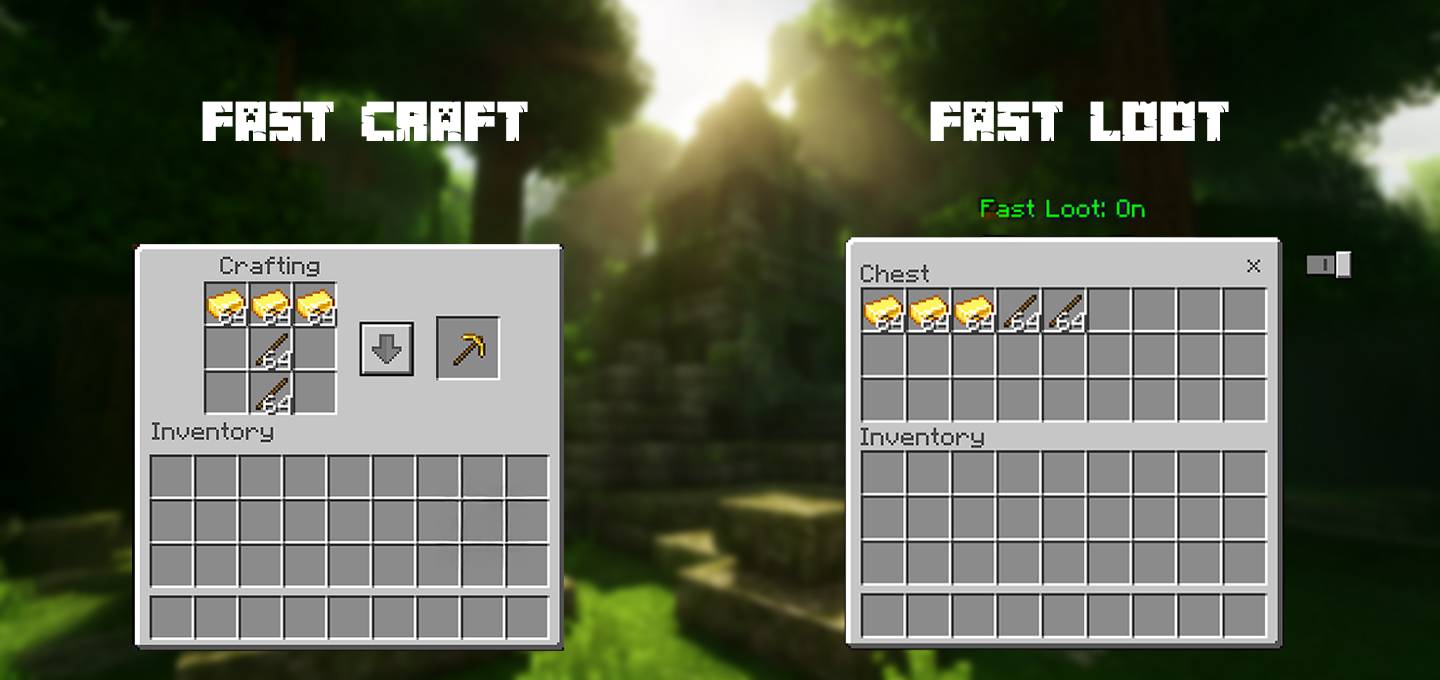
Fast Craft/Quick Craft:
Adds a button in the UI that lets you craft multiple items at once. Instead of cliking again and again for crafting a same item again, just click the fast craft button once and you're done! This Button is added to following UI screens: Player Inventory, Crafting inventory, Stonecutter inventory and Villager's trading UI. It is available in both and Classic and Pocket UI
Fast Loot/Quick Loot:
Adds a toggle button in the UI that lets you quickly move items between your inventory and containers. Instead of dragging and dropping items one by one, just turn on the toggle and click to instantly transfer them. This feature is available for all container screens in both Classic and Pocket UI.
This is one of the hidden feature of the minecraft bedrock, and this resource pack enables it. This texture pack is completely compatible with any other resource pack. Works on both pocket and classic ui And On mobile and PC.
Video Showcase
Important Note (for pocket UI on mobile only): the Button is positioned well with -1 And -2 Gui scale.
Change Subpacks for different features set.
Learn About Subpacks: https://mod-mcpe.app/tutorials#bedrock-subpacks
Similar texture packs:
ESP texture Pack: Entities like players, mobs, chests, beds, etc become See-thru from blocks.
Custom Crosshair: Adds Multiple new styles of crosshair.
Smooth Font: Adds new smooth font in minecraft.
Invisibility hider: Hidden players become detectable.
1. You are allowed to make video on the addon but give credits in video description.
2. You are allowed to use it in your project, but only with my permission. Discord username: grumm7613
3. You are not allowed to publish the texture on any other website and claim it as yours.
Join My Discord Server: https://discord.gg/Wvst4znsgk
Download the New Bedrock Manager application to easily install and manage your minecraft addons, worlds and more!
Download Now! (Windows only, android in future)
Enjoy!
👉 Click the banner or [start here] to get going. Use code MODMCPE40 for 40% off!
💬 Curious what players think? Check out the community discussion on [Best Minecraft Server Hosting].
Images
What’s new in the latest update
The author’s notes for the file uploaded .
changelog - 3.9
Added Italian language support.
Video
How to install
- Download the file below. On iOS or Android, open it from your Downloads with Minecraft; on Windows, double-click it.
- Minecraft imports the pack automatically. Enable it in your world’s settings under Behavior Packs or Resource Packs; an add-on usually needs both.
- Playing on a Realm or server? Everyone needs the same packs, and the host has to enable them.
- Starting a new world? Choose its seed first: the Seed Map shows villages, structures and biomes near spawn for any Bedrock seed.
Advertisement