Gojo Satoru Animated UI
BedrockTexture packOtherby Anime_lover99
About this texture pack
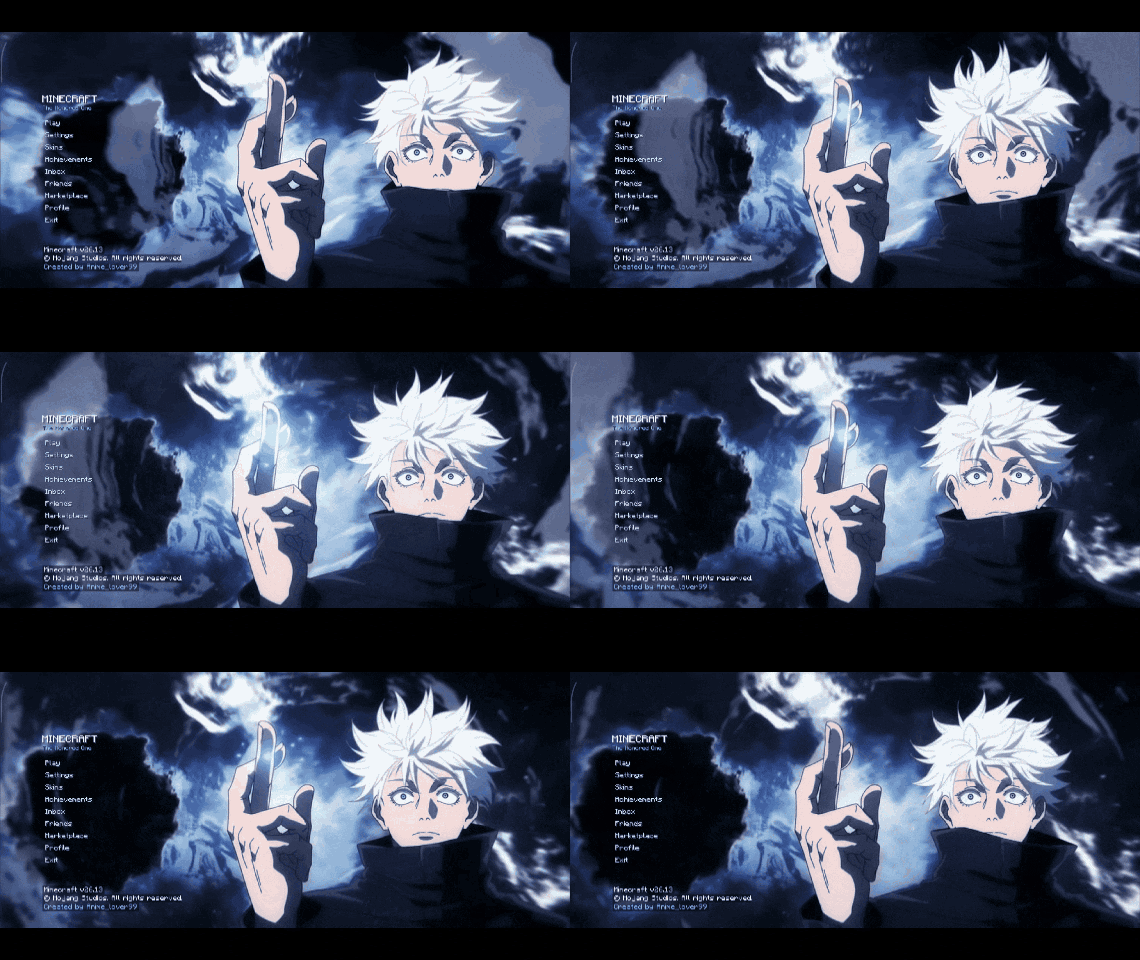
Transform your Minecraft Bedrock main menu with Gojo Satoru! ⚡ Features an animated anime background, custom blue-themed UI, stylish menu animations, and a “The Honored One” ae...
Read the author’s full description (321 words)
Written by Anime_lover99.
Gojo Satoru Animated UI
Bring the power and style of Gojo Satoru from Jujutsu Kaisen to your Minecraft Bedrock Edition main menu!
Gojo Satoru Animated UI is a custom resource pack that transforms Minecraft's start screen with anime-inspired visuals, an animated background, and a blue-themed interface. Designed for fans of Gojo and Jujutsu Kaisen, this pack gives your Minecraft menu a fresh, stylish look.
✨ Features
- Animated Gojo Background: Enjoy a sequence of Gojo Satoru images that brings your main menu to life.
- Custom Main Menu: Experience a redesigned start screen with a distinctive anime-inspired appearance.
- Blue-Themed Interface: Blue accents and matching visual effects create a cohesive look inspired by Gojo's iconic powers.
- Animated UI Elements: Custom menu animations add extra movement and style to the interface.
- Stylish Menu Buttons: Custom button states, including hover and pressed effects, enhance the menu's appearance.
- “The Honored One” Aesthetic: A tagline inspired by one of Gojo's most iconic themes.
- Resource Pack Installation: Import the ".mcpack" file into Minecraft Bedrock Edition and activate the pack through the resource pack settings.
🎮 Compatibility
- Edition: Minecraft Bedrock Edition / Pocket Edition (PE)
- Pack type: Resource Pack
- Minimum engine version specified: 1.21.0
Compatibility may vary across Minecraft versions and devices because the pack modifies custom UI files.
📥 Installation
1. Download the Gojo Satoru Animated UI ".mcpack" file.
2. Open the file with Minecraft to import the resource pack.
3. Open Minecraft's resource pack settings.
4. Activate the pack in the appropriate resource pack list.
5. Return to the main menu and enjoy the Gojo-inspired interface.
If the custom menu does not display correctly, try disabling other resource packs that modify the Minecraft UI.
💙 For Gojo and Anime Fans
Give your Minecraft menu a new identity with animated Gojo Satoru visuals and a clean blue-themed interface!
Note: This is a fan-made Minecraft resource pack inspired by Jujutsu Kaisen. It is not an official product of Minecraft or the anime's rights holders.
Images
How to install
- Download the file below. On iOS or Android, open it from your Downloads with Minecraft; on Windows, double-click it.
- Minecraft imports the pack automatically. Enable it in your world’s settings under Behavior Packs or Resource Packs; an add-on usually needs both.
- Playing on a Realm or server? Everyone needs the same packs, and the host has to enable them.
- Starting a new world? Choose its seed first: the Seed Map shows villages, structures and biomes near spawn for any Bedrock seed.
Advertisement