Shaula Ui | Anime Girl Animated Menu
BedrockTexture packPerformanceby YashGameplay
About this texture pack
Transform Minecraft Bedrock with Shaula UI inspired by Re:Zero! Features an ultra-fluid 106-frame 1080p live anime menu, custom anime BGM OST, glowing amber GUI, and 2 performan...
Read the author’s full description (389 words)
Written by YashGameplay.
Shaula UI - Re:Zero Animated Theme for Minecraft Bedrock
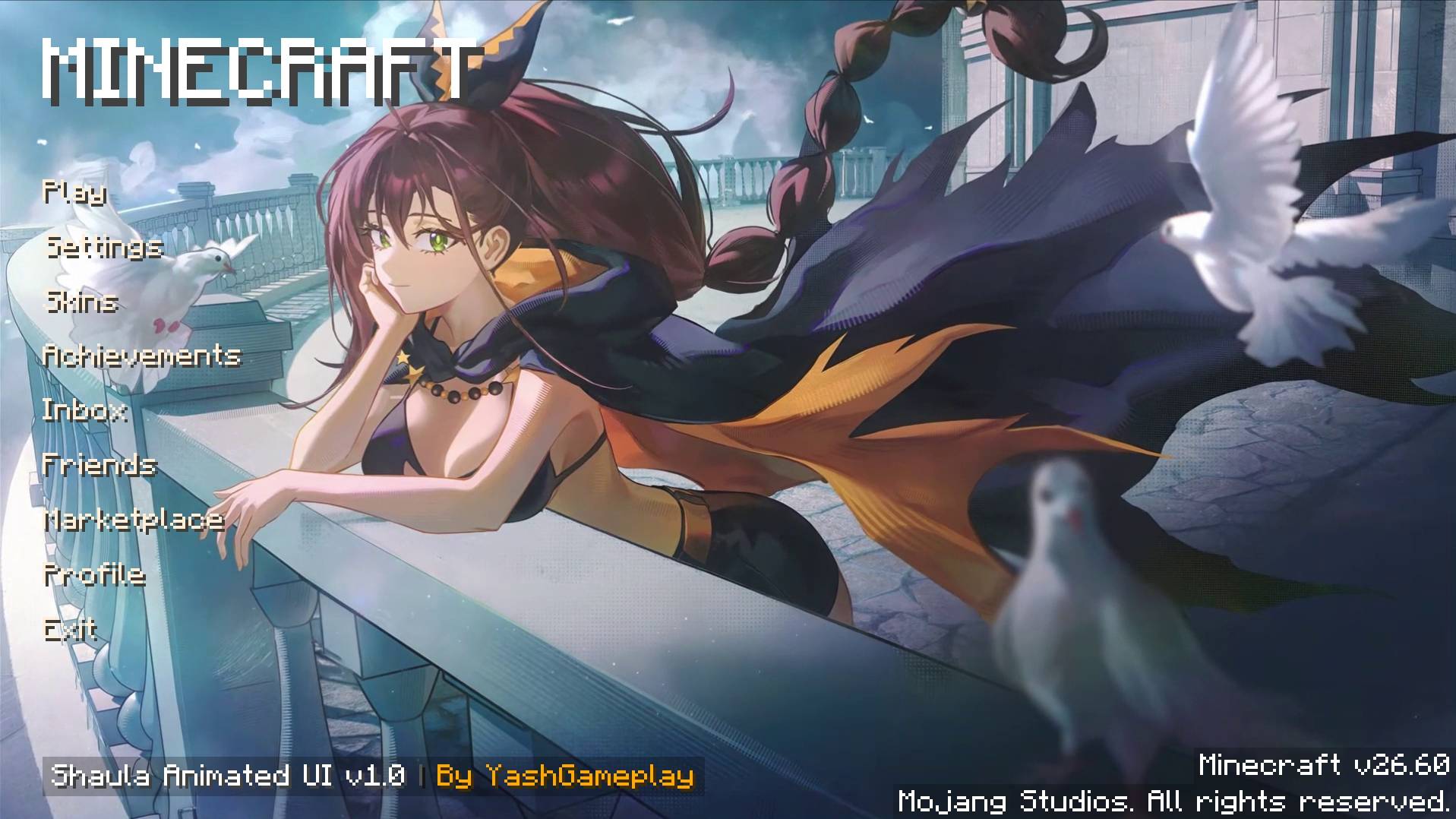
Bring the legendary Sage Shaula directly to your Minecraft Bedrock main menu! Shaula UI delivers an ultra-fluid, custom-rendered 106-frame Full HD 1080p anime background featuring Shaula resting on the balcony with doves, glowing amber scorpion UI styling, and a chill custom anime background music OST.
📢 Looking for the Classic Hu Tao UI?
- 🌸 All previous versions (including the classic Hu Tao Animated UI) are still 100% preserved and available!
- If you want to use or switch back to the Hu Tao theme at any time, simply head over to the [Files] tab at the top of this project page and download the Hu Tao release file directly.
✨ Features & Highlights
- 🎬 106-Frame Seamless Living Wallpaper: Native 1080p high-frame-rate animation synchronized at 20-FPS (0.05s per tick). Ends on a natural closed-eye blink with 0 jump or snap when restarting.
- 🎵 Custom Main Menu Background Music (BGM / OST):
- Integrated 1-minute 50-second full anime background theme streaming directly from disk with 0 MB memory overhead.
- Smooth 1.5s fade curves for click-free looping, replacing vanilla menu music with zero delay.
- Note: Set your Music volume to ~20% under Settings > Audio for the most relaxing experience!
- ⚙️ Customizable In-Game Subpacks (Gear ⚙️ Icon):
- 🌟 1080p Ultra Quality [Default]: Full 106-frame live anime animation for PC and high-end devices.
- 🛑 Static Wallpaper Mode: High-resolution eyes-open balcony portrait with zero animation overhead — perfect for budget devices (2GB/3GB RAM) and competitive PvP.
- 📐 Clean Client UI Layout: MINECRAFT title placed cleanly in the open top-left sky, glowing amber hover button animations, and bottom-left watermark.
- 📱 Universal Bedrock Compatibility: Fully supported across Windows 10/11, Android (MCPE), iOS, and Consoles on Minecraft 1.20 and 1.21 .
- 🚀 Zero Lag Impact: Standalone lightweight engine with 0 content log errors.
📌 How to Install & Apply (Important):
- Download and open Shaula_UI.mcpack to auto-import into Minecraft.
- Go to Settings > Global Resources.
- Activate Shaula Animated UI (Place it at the top of your active resource pack list).
- In Settings > Audio, set Music Volume to ~20% to hear the custom background music.
- (Optional) Click the ⚙️ Gear Icon on Shaula UI to select your preferred mode (1080p Ultra Quality / Static Zero-Lag Mode).
- Return to the main menu and enjoy!
📜 Credits & Info:
- Theme: Shaula the Sage (Re:Zero − Starting Life in Another World )
- Pack Creator: YashGameplay
- Audio OST: 1:50 Chill Anime Background Theme
- Support: Bedrock Edition 1.20.0 - 1.21.40 (PC, Android/MCPE, iOS, Consoles)
Images
What’s new in the latest update
The author’s notes for the file uploaded .
Anime UI Overhaul | Shaula Animated UI
Welcome to the brand-new Shaula the Sage (Amber Edition) update! Bring the legendary character Shaula from Re:Zero directly to your Minecraft Bedrock main menu with an ultra-fluid 106-frame Full HD 1080p live animated background, custom Anime Background Music OST, and glowing warm amber UI aesthetics!
📢 Important Note: Looking for the Classic Hu Tao UI?
🌸 Don't worry! All previous versions (including the classic Hu Tao Animated UI) are still 100% preserved and available!
If you prefer the Hu Tao theme or want to switch back at any time:
- Click on the [Files] tab at the top of this project page.
- Scroll down to the previous releases.
- Download the Hu Tao UI file directly. You have full freedom to choose whichever anime theme you love best!
🎧 Audio Recommendation:
📢 Note: To hear the custom anime background music, make sure the Music slider is turned on in Minecraft under Settings > Audio. Setting your Music volume to around 20% is strongly recommended for the most balanced, pleasant, and relaxing listening experience!
✨ What's New in the Shaula Amber Edition Update:
🎵 Custom Main Menu Background Music (BGM / OST):
- Integrated 1-minute 50-second full anime background theme (shaula_bgm.ogg).
- Mastered in pristine 44.1kHz Ogg Vorbis with gentle 1.5s fade-in and fade-out curves for seamless, click-free looping.
- Replaces all vanilla menu music ("replace": true) with zero delay (min_delay: 0, max_delay: 0).
- Streams directly from disk with 0 MB memory overhead (stream: true).
- Visual animation and audio run 100% independently for the ultimate living anime menu experience!
🌟 106-Frame 1080p Seamless Blink Loop Animation:
- Silky smooth 20-FPS (0.05s) tick-synchronized playback at native 1920x1080 resolution.
- True 24-Bit Studio RGB: Clean uncompressed studio colors with zero palette grain or color flicker.
- Seamless Natural Blink Reset: The animation ends precisely as Shaula closes her eyes, smoothly transitioning back to the opening blink — eliminating loop jumps and snapping completely!
- 100% Watermark-Free Artwork: Zero intrusive watermarks or overlay logos on the artwork.
🖼️ Refreshed High-Resolution Static Mode:
- Beautiful eyes-open Shaula balcony art with doves (shaula_static_background.png).
- 0 MB VRAM footprint for budget devices (2GB/3GB RAM) or competitive PvP.
📐 Optimized UI Layout:
- Start screen MINECRAFT title placed cleanly in the top-left sky header, with the watermark moved to the bottom-left corner for balanced, uncluttered character visibility.
- Custom styled button hover and pressed animations in glowing warm amber and scorpion orange.
- Refreshed watermark: Shaula Animated UI v1.0 | By YashGameplay.
🎛️ Dual-Mode Performance Subpacks (Gear ⚙️ Icon):
- 🌟 1080p Ultra Quality [Default]: Full 106-frame colored animated background for PC, tablets, and high-spec mobile devices.
- ⚡ Static Mode (Zero Lag / Potato Devices): Instant-loading high-resolution static wallpaper.
🌐 Universal Compatibility:
- 0 Content Log errors.
- Tested on Minecraft Bedrock Windows 10/11 & Android (MCPE) 1.20 through 1.21+.
- 100% Safe on Realms and featured servers (The Hive, CubeCraft, NetherGames).
📥 How to Install:
- Double-click or tap Shaula_UI.mcpack to auto-import into Minecraft.
- Go to Settings > Global Resources > My Packs and activate Shaula Animated UI.
- In Settings > Audio, set Music Volume to ~20% to enjoy the custom anime BGM.
- (Optional) Tap the Gear (⚙️) icon on the pack to toggle between 1080p Ultra Quality and Static Zero-Lag Mode.
- Return to the main menu and enjoy!
Created with ❤️ by YashGameplay.
How to install
- Download the file below. On iOS or Android, open it from your Downloads with Minecraft; on Windows, double-click it.
- Minecraft imports the pack automatically. Enable it in your world’s settings under Behavior Packs or Resource Packs; an add-on usually needs both.
- Playing on a Realm or server? Everyone needs the same packs, and the host has to enable them.
- Starting a new world? Choose its seed first: the Seed Map shows villages, structures and biomes near spawn for any Bedrock seed.
Advertisement