YGP! X-RAY
BedrockTexture packOtherby Yojitgamingpro
About this texture pack
A lightweight Minecraft Bedrock X-Ray resource pack that makes underground terrain transparent and reveals valuable ores.
Read the author’s full description (1,451 words)
Written by Yojitgamingpro.
🔎 YGP! X-RAY
See What Others Can't!
YGP! X-RAY is a Minecraft Bedrock resource pack designed to make underground exploration easier by improving the visibility of valuable ores and resources.
The updated version focuses on clearer ore identification, stronger underground visibility, improved Nether resource visibility, and a lightweight resource-pack-only design.
Created by YGP Studio / YGP Minecraft.
💎 WHAT DOES YGP! X-RAY DO?
YGP! X-RAY reduces visual obstruction around underground resources so important ores are easier to locate and identify.
The goal is simple:
Find ores faster. Identify them clearly. Explore underground more easily.
The pack focuses on resource-pack rendering rather than gameplay scripts.
⛏️ ORE SUPPORT
YGP! X-RAY provides visibility support for major Minecraft ores and valuable resources.
Overworld Ores
💎 Diamond Ore
💚 Emerald Ore
🟨 Gold Ore
⚪ Iron Ore
🟧 Copper Ore
⚫ Coal Ore
🔴 Redstone Ore
🔵 Lapis Lazuli Ore
Deepslate Ores
💎 Deepslate Diamond Ore
💚 Deepslate Emerald Ore
🟨 Deepslate Gold Ore
⚪ Deepslate Iron Ore
🟧 Deepslate Copper Ore
⚫ Deepslate Coal Ore
🔴 Deepslate Redstone Ore
🔵 Deepslate Lapis Lazuli Ore
Nether Resources
💠 Ancient Debris
⬜ Nether Quartz Ore
🟨 Nether Gold Ore
🔥 NETHER SUPPORT
YGP! X-RAY also supports important Nether resources.
The pack improves the visibility of:
Ancient Debris
Nether Quartz Ore
Nether Gold Ore
This is particularly useful when exploring darker Nether environments.
✨ FEATURES
Advanced underground X-Ray visibility
Improved ore visibility
Clearer resource identification
Overworld ore support
Deepslate ore support
Nether resource support
Ancient Debris visibility
Nether Quartz visibility
Nether Gold visibility
Improved underground transparency
Improved cave visibility
Improved Nether visibility
Improved ore contrast
Water visibility support
Lava visibility support
Lightweight resource-pack design
No JavaScript required
No behavior pack required
No gameplay scripts
No custom shader required
Mobile-friendly design
PC-friendly design
🎨 CLEAR ORE IDENTIFICATION
YGP! X-RAY is designed to keep resources visually recognizable.
The visual system focuses on making ores stand out from surrounding terrain without removing their recognizable Minecraft-style appearance.
Examples include:
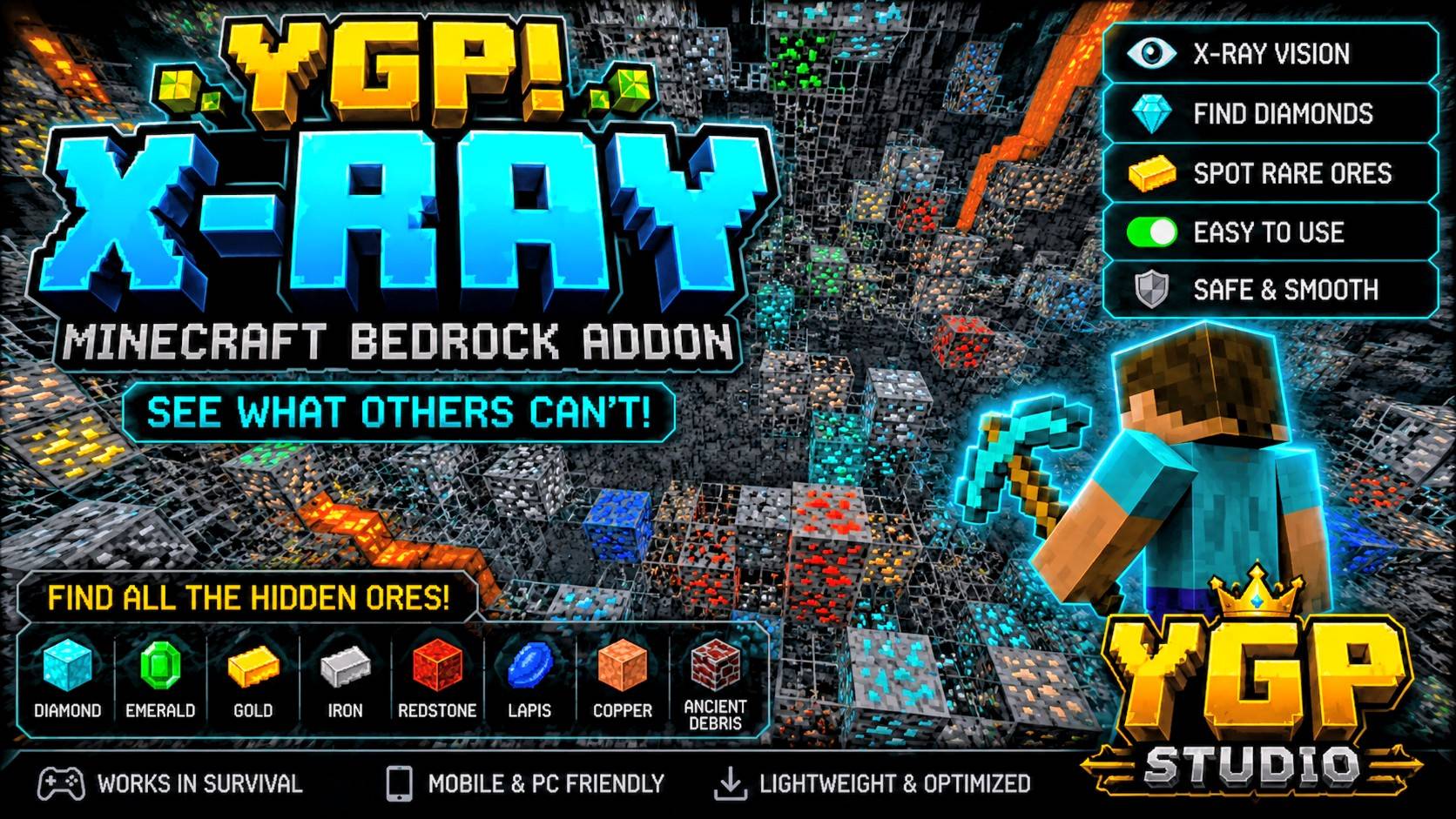
💎 Diamond → Blue/Cyan 💚 Emerald → Green 🟨 Gold → Gold/Yellow ⚪ Iron → Light/Metallic 🟧 Copper → Orange/Copper ⚫ Coal → Dark 🔴 Redstone → Red 🔵 Lapis → Blue 💠 Ancient Debris → Dark Netherite-style appearance
See the ore → recognize the ore.
🔍 UNDERGROUND VISIBILITY
The resource pack improves visibility through underground terrain such as:
Stone
Deepslate
Underground terrain
Cave environments
Nether terrain
The purpose is to reduce unnecessary visual obstruction while keeping valuable resources recognizable.
🌙 NIGHT VISION
YGP! X-RAY can be used together with Minecraft's Night Vision effect.
Recommended combination:
YGP! X-RAY Night Vision
Night Vision can be useful when exploring dark caves and other low-light environments.
🌈 VIBRANT VISUALS
If your Minecraft version and device support Vibrant Visuals, you can try using it together with YGP! X-RAY.
Vibrant Visuals can require additional GPU performance.
If you experience:
FPS drops
Stuttering
Heating
Lag
consider turning Vibrant Visuals off.
Performance varies depending on your device, Minecraft version, render distance, world complexity, and other active resource packs.
📱 MOBILE & PC
YGP! X-RAY is designed for both mobile and PC Bedrock players.
The pack does not require:
JavaScript
Behavior-pack scripting
Gameplay scripts
Heavy particle systems
Custom shaders
External software
Because performance depends on the device and Minecraft configuration, results may vary between systems.
⚡ PERFORMANCE-FOCUSED DESIGN
YGP! X-RAY uses a resource-pack-focused approach.
It does not require:
Tick-based gameplay scripts
Entity scanning
Custom gameplay logic
External applications
This keeps the pack focused on visual resource visibility.
⚙️ HOW TO INSTALL
YGP! X-RAY is distributed as a .mcpack resource pack.
Android / iOS
Download the YGP! X-RAY .mcpack.
Open the downloaded file.
Select Minecraft if your device asks which application to use.
Wait for Minecraft to import the pack.
Open Minecraft.
New World
Open Minecraft Bedrock.
Select Play.
Select Create New.
Select Create New World.
Open Resource Packs.
Select My Packs.
Find YGP! X-RAY.
Select Activate.
Create the world.
Existing World
Open Minecraft Bedrock.
Select Play.
Find your world.
Open the world settings.
Select Resource Packs.
Open My Packs.
Find YGP! X-RAY.
Select Activate.
Return to the world.
⚠️ MULTIPLAYER NOTICE
X-Ray resource packs may not be permitted on some multiplayer servers.
Always follow the rules of the server or world you are playing on.
YGP Studio does not encourage using unauthorized modifications to gain an unfair advantage on multiplayer servers.
📱 MINECRAFT COMPATIBILITY
Target: Minecraft Bedrock Edition 26.50 / 26.xx
YGP Minecraft development is currently focused on the 26.xx generation.
Compatibility with individual Minecraft releases can vary if Mojang changes resource-pack rendering behavior.
Always use the latest CurseForge file for the currently supported release.
👑 CREATED BY YGP STUDIO
Creator: Yojitgamingpro Studio: YGP Studio Brand: YGP Minecraft
YGP! X-RAY is an independent Minecraft Bedrock resource pack created as part of the YGP Minecraft project.
Official YGP Links
YGP Minecraft: https://ygpminecraft.pages.dev/
YGP Studio: https://ygp-studio.vercel.app/
Yojit Gaming Pro: https://youtube.com/@yojitgamingpro
YGP Minecraft: https://youtube.com/@ygpminecraft
YGP Tech: https://youtube.com/@ygptech_official
📦 VERSION
YGP! X-RAY v6.0.0
Minecraft Bedrock Edition — 26.xx generation
Created by YGP Studio / YGP Minecraft
📜 CHANGELOG
🔥 v6.0.0 — NEXT-GENERATION YGP X-RAY
💎 Improved Ore Visibility
Improved valuable ore visibility.
Improved ore identification.
Improved visual separation between ores and surrounding terrain.
Improved Overworld ore visibility.
Improved Deepslate ore visibility.
Improved underground resource readability.
🔥 Improved Nether Support
Improved Ancient Debris visibility.
Improved Nether Quartz Ore visibility.
Improved Nether Gold Ore visibility.
Improved visibility in darker Nether environments.
🔍 Improved Underground Visibility
Improved underground transparency.
Improved cave visibility.
Improved resource visibility through surrounding terrain.
Improved overall X-Ray visual clarity.
🎨 Visual Improvements
Improved ore contrast.
Improved visual consistency between resource types.
Improved recognizable Minecraft-style ore appearance.
Improved overall resource identification.
⚡ Performance Focus
Continued the resource-pack-focused architecture.
No JavaScript gameplay system required.
No behavior pack required.
No gameplay scripts required.
No external application required.
Kept the pack focused on visual rendering.
📱 Mobile & PC
Continued support for mobile Bedrock gameplay.
Continued support for PC Bedrock gameplay.
Maintained a lightweight approach where possible.
🌈 Visual Compatibility
Preserved Night Vision compatibility.
Preserved Vibrant Visuals compatibility where supported.
🌐 Website Update
Updated the official YGP Minecraft website to: https://ygpminecraft.pages.dev/
Updated official YGP information.
Removed the old YGP Minecraft Vercel website reference.
🧹 Information System
Removed unnecessary informational chat messaging.
YGP information is intended to use the YGP Wiki system instead of large chat messages.
🔒 Preserved
Existing ore support
Deepslate ore support
Nether resource support
Night Vision compatibility
Vibrant Visuals support where compatible
Mobile support
PC support
Resource-pack-only architecture
YGP! X-RAY changelog
9.0.0
- Added the YGP Ore Finder item.
- Use it, pick the ore you want, and it reports the nearest loaded location with coordinates, distance, and direction.
- A short particle line points toward the found ore.
- Ores you can pick: Diamond, Emerald, Gold, Iron, Copper, Coal, Redstone, Lapis, Ancient Debris, Nether Quartz, Gilded Blackstone.
- Ore Finder stays in inventory and is kept on death.
- Wiki book still stays in inventory and is kept on death.
- Sightlines are longer. Max Clear fog is stronger.
- Diamond stays full light blue. Lapis stays very dark blue.
- Ore Finder only sees loaded chunks. It does not bypass server anti-X-ray.
8.0.0
- Ultra update: more filler hidden, including polished stone, deepslate bricks and tiles, tuff bricks, and extra plants.
- Max Clear also hides stone bricks, blackstone builds, and End structure filler.
- Air, water, and lava fog start farther away.
- Lighting is brighter in the Overworld, Nether, and End.
- Ore letters are thicker.
7.0.1
- Diamond changed to a full light blue.
- Lapis changed to a very dark blue.
- Stone and Deepslate versions both updated.
7.0.0
- Remade every ore texture as a solid color with one letter.
- Deepslate ores use the same letter inside a dark frame.
- Letter code: D Diamond, E Emerald, G Gold, I Iron, C Copper, K Coal, R Redstone, L Lapis, N Nether Gold, Q Quartz, A Ancient Debris, B Gilded Blackstone.
- Wiki gained an Ore Letters page.
🕘 v1.2.0 — ADVANCED X-RAY UPDATE
Improved valuable ore visibility.
Improved ore identification.
Expanded Deepslate ore visibility.
Improved Nether resource visibility.
Added/expanded Ancient Debris visibility.
Added/expanded Nether Quartz visibility.
Added/expanded Nether Gold visibility.
Improved underground visibility.
Improved ore contrast.
Improved resource-pack efficiency.
Fixed visual inconsistencies.
Improved compatibility and stability.
🕘 v1.1.0 — ADVANCED X-RAY UPDATE
Expanded ore coverage.
Added/expanded Deepslate ore visibility.
Added Nether-focused resource support.
Improved underground visibility.
Improved ore identification.
Added Ancient Debris visibility.
Added Nether Quartz visibility.
Added Nether Gold visibility.
Improved mobile and PC support.
Kept the pack lightweight.
What changed: 10.0.0 Scan range is 48 blocks instead of 32. One ore now reports the nearest 3 locations. New Scan All button lists the nearest of every ore. Particle line points to the closest one and repeats once. More plants and cave filler are hidden. Max Clear hides extra structure filler and copper grates. Fog starts farther away, and lighting is brighter. Wiki and Ore Finder still stay in inventory and are kept on death. Diamond stays full light blue. Lapis stays very dark blue.
⚠️ DISCLAIMER
Minecraft is a trademark of Mojang Studios/Microsoft.
YGP! X-RAY is an independent community-made Minecraft Bedrock resource pack and is not affiliated with, endorsed by, or sponsored by Mojang Studios or Microsoft.
© 2026 YGP Studio. All rights reserved.
Images
What’s new in the latest update
The author’s notes for the file uploaded .
What changed: Scan range is 48 blocks instead of 32. One ore now reports the nearest 3 locations. New Scan All button lists the nearest of every ore. Particle line points to the closest one and repeats once. More plants and cave filler are hidden. Max Clear hides extra structure filler and copper grates. Fog starts farther away, and lighting is brighter. Wiki and Ore Finder still stay in inventory and are kept on death. Diamond stays full light blue. Lapis stays very dark blue.
How to install
- Download the file below. On iOS or Android, open it from your Downloads with Minecraft; on Windows, double-click it.
- Minecraft imports the pack automatically. Enable it in your world’s settings under Behavior Packs or Resource Packs; an add-on usually needs both.
- Playing on a Realm or server? Everyone needs the same packs, and the host has to enable them.
- Starting a new world? Choose its seed first: the Seed Map shows villages, structures and biomes near spawn for any Bedrock seed.
Advertisement