All texture packs
Outline Texture Pack
BedrockTexture packShadersby voxenMC2
About this texture pack
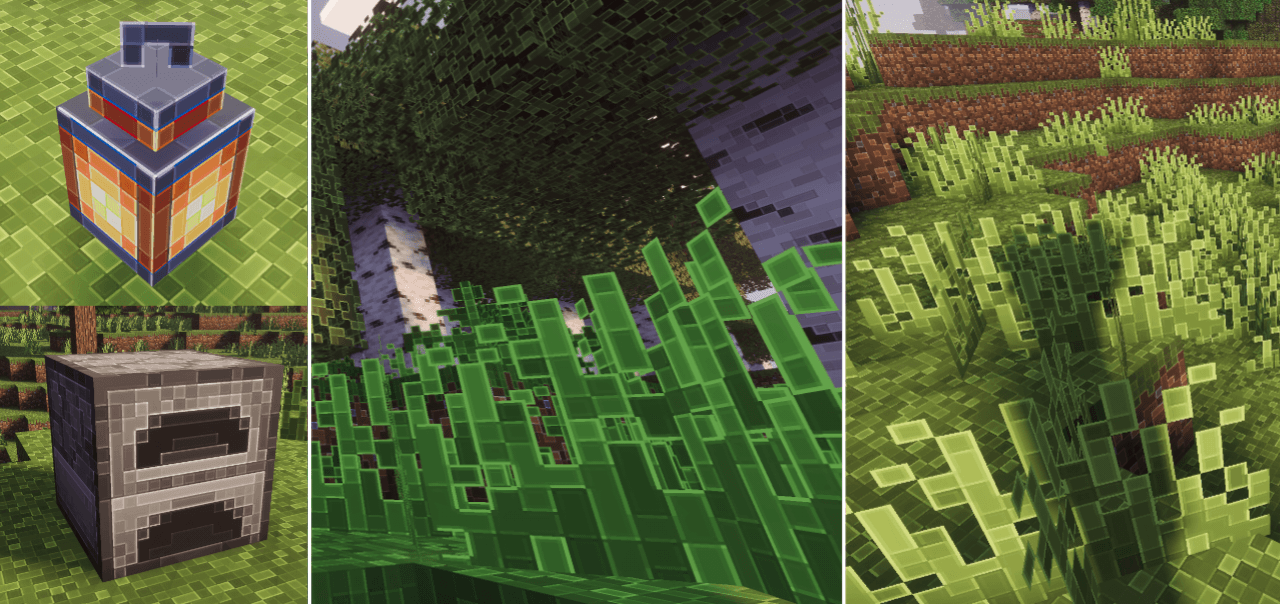
This Minecraft texture pack sharpens and outlines textures, giving your game a crisp, detailed, and polished look. Perfect with shaders, it enhances visuals while remaining comp...
Read the author’s full description (122 words)
Written by voxenMC2 for the MCPEDL post, shown as published.
This texture pack sharpens and adds outlines to Minecraft textures, giving your game a more detailed and refined look while keeping the original style.
Recommendation: Use this pack with a shader to make your game look like the preview images. The shader used in the preview is Prizma Shader.Issues / Note: This pack is currently at 128×128 resolution. On some low-end devices, performance may be affected. If your device cannot handle this resolution for example, the game crashes or fails to open you can use the lower-resolution versions for better compatibility. Preview: All preview images showcase the 128×128 version. This pack is 128×128, so quality matches the preview. Lower-resolution packs may be used if your device cannot handle the full resolution.
Images
What’s new in the latest update
The author’s notes for the file uploaded .
- Added new update 26.50 textures in 256x variant
How to install
- Download the file below. On iOS or Android, open it from your Downloads with Minecraft; on Windows, double-click it.
- Minecraft imports the pack automatically. Enable it in your world’s settings under Behavior Packs or Resource Packs; an add-on usually needs both.
- Playing on a Realm or server? Everyone needs the same packs, and the host has to enable them.
- Starting a new world? Choose its seed first: the Seed Map shows villages, structures and biomes near spawn for any Bedrock seed.
Advertisement