What Am I Looking At? (WAILA)
BedrockAdd-onOtherby r4isen1920
About this add-on
See what you are looking at as displayed in the HUD.
Read the author’s full description (397 words)
Written by r4isen1920 for the MCPEDL post, shown as published.
See what you are looking at directly from your HUD! This utility Add-On adds a display on top of your screen, packed with intuitive and useful information about the world around you.
Features
- Intuitive display design
- Multiplayer & survival-friendly
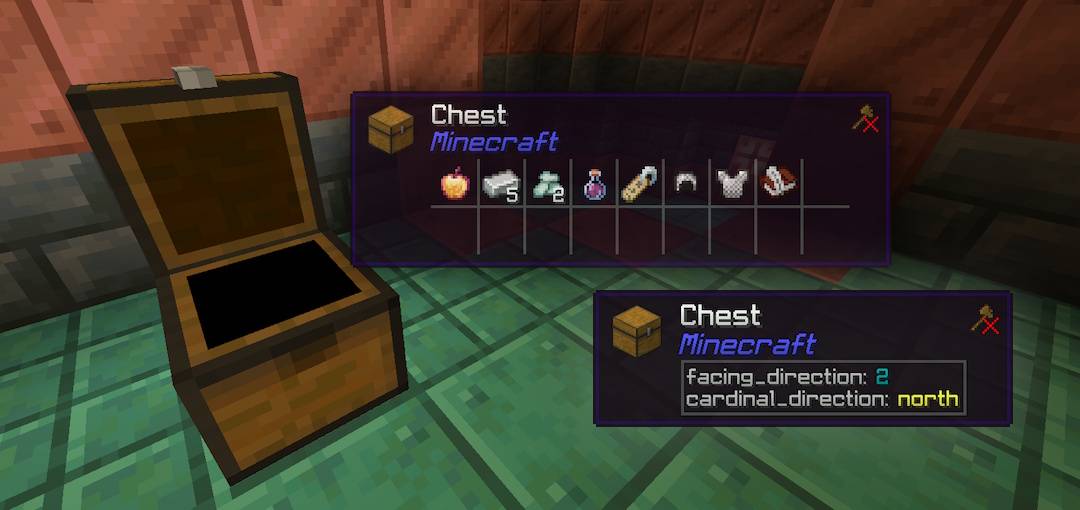
- Displays the block/entity name, and the Add-On it is from
- Renders the block/entity icon accurately
- Shows which correct tool to use, and if you're holding it or not
- Works with most other Add-Ons and packs
- Supports all languages
- Lightweight, and easy to use
Screenshots and Previews
Customization
You can run the /waila command to customize tailored to your needs! Alternatively, you can also adjust the WAILA setting for other players by running it like so: /waila [player (requires you to be opped).
Installation Notes
For the best gameplay experience, please take note of these before attempting to download the pack:
- This Add-On works in multiplayer.
- For Aternos, please refer to instructions here.
- You need to have an active Realms subscription to use this in Realms. To install on Realms, please check on Minecraft's website.
- Or locally via Wi-Fi or LAN.
- This Add-On does not modify the player.json. So it should work with other Add-Ons.
- This Add-On only supports Bedrock 1.21.100 or higher.
- This Add-On does NOT require any experimental toggle.
License & Usage
This Add-On is under MIT License. If you wish to attribute this work into your own, please refer to the license accordingly.
Copyright 2026 r4isen1920
Permission is hereby granted, free of charge, to any person obtaining a copy of this software and associated documentation files (the "Software"), to deal in the Software without restriction, including without limitation the rights to use, copy, modify, merge, publish, distribute, sublicense, and/or sell copies of the Software, and to permit persons to whom the Software is furnished to do so, subject to the following conditions:
The above copyright notice and this permission notice shall be included in all copies or substantial portions of the Software.
THE SOFTWARE IS PROVIDED "AS IS", WITHOUT WARRANTY OF ANY KIND, EXPRESS OR IMPLIED, INCLUDING BUT NOT LIMITED TO THE WARRANTIES OF MERCHANTABILITY, FITNESS FOR A PARTICULAR PURPOSE AND NONINFRINGEMENT. IN NO EVENT SHALL THE AUTHORS OR COPYRIGHT HOLDERS BE LIABLE FOR ANY CLAIM, DAMAGES OR OTHER LIABILITY, WHETHER IN AN ACTION OF CONTRACT, TORT OR OTHERWISE, ARISING FROM, OUT OF OR IN CONNECTION WITH THE SOFTWARE OR THE USE OR OTHER DEALINGS IN THE SOFTWARE.
What’s new in the latest update
The author’s notes for the file uploaded .
Changelog (v5.1)
This minor update resolves some issues that have been reported:
- Fixed invalid UI handling when attempting to view a dropped item
- Disabled experimental setting: Container Inventory by default
- Block states, by default, now only display when sneaking
- Added further support to more Add-Ons in the pack author namespace
Hotfix Patch v5.1.1
- Fixed an issue whereby the publish build wasn't working correctly due to an unhandled missing variable
- Bumped version number in manifest and pack names
How to install
- Download the file below. On iOS or Android, open it from your Downloads with Minecraft; on Windows, double-click it.
- Minecraft imports the pack automatically. Enable it in your world’s settings under Behavior Packs or Resource Packs; an add-on usually needs both.
- Playing on a Realm or server? Everyone needs the same packs, and the host has to enable them.
- Starting a new world? Choose its seed first: the Seed Map shows villages, structures and biomes near spawn for any Bedrock seed.
Advertisement
More add-ons
- Add-ons
Better Foliage Addon/Texture Pack for Bedrock(Major Bugfixes!)
by Fused Bolt
- Downloads
- 2.5M
- Rating
- 3.7