Waila GT
BedrockAdd-onOtherby Sr REX

About this add-on
Everything you're looking at, shown on your HUD.
Read the author’s full description (542 words)
Written by Sr REX for the MCPEDL post, shown as published.
Waila GT V2 — The tooltip Bedrock has been missing. Point at anything and instantly know everything: what it is, how to harvest it, what's inside it, how much health it has left. No more guessing, no more opening menus, no more breaking immersion. Just look, and know.
IMPORTANT NOTE — Please ensure this add-on is placed as high as possible in your behavior pack load order to prevent conflicts or errors.
No Experimental Features Achievements Friendly Multiplayer Ready Block & Entity Info Inventory Preview SettingsFEATURES
Instant Block Intelligence — Aim at any block and the HUD tells you exactly what tool to use, whether the one in your hand is correct, and — for crops — precisely how far along they are. No more digging blind.
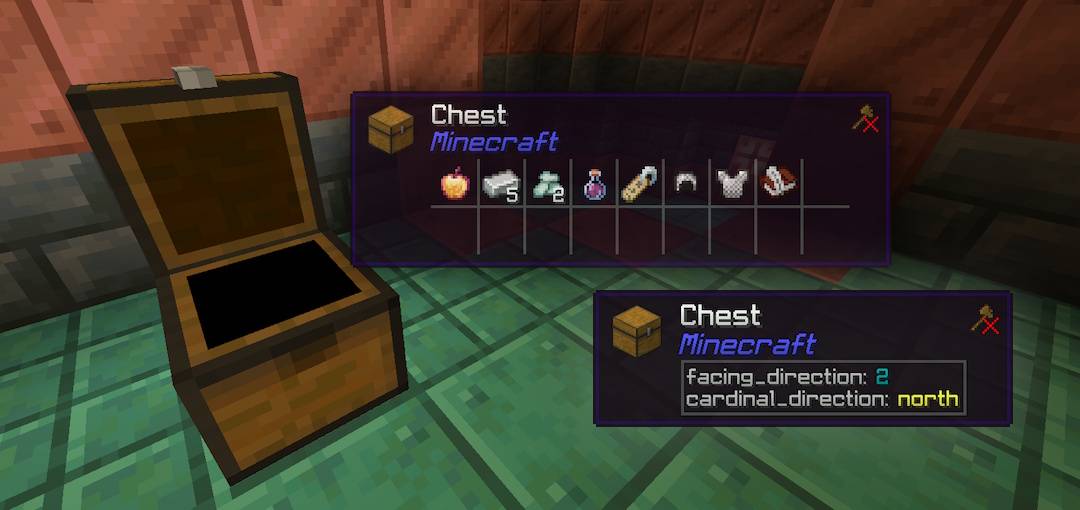
Container Preview — Point at chests, barrels, hoppers, dispensers, or droppers to preview their complete contents in real time. Previously an experimental toggle, container preview is now a fully integrated, stable core feature.
Furnace Smelting Readout — Look at any active furnace, blast furnace, or smoker to monitor estimated cooking progress, remaining fuel burn time, and output preview without opening menus. Dynamic timers provide a real-time approximation of your smelting cycle.
Smart Interaction Icons — Instantly see if a mob can be bred, tamed, ridden, or traded — and whether you're holding the right item for it.
Full Entity Readout — Health, armor, and every active status effect, all rendered live the moment you look at any mob or player. A rendered 3D portrait puts a face to every stat.
Unified and comprehensive customization — All settings are managed via two commands. Run /pmenu to open the personal panel and configure your settings—this also works with any other GT add-ons you have installed.
Additionally, server administrators can run /menu to establish default settings for everyone, applying them globally to all players.
COMPATIBILITY
- No experimental features required
- Multiplayer and Realms compatible
REQUIREMENTS
- Minecraft Bedrock Edition 1.26.50
LIMITATIONS
- The only exception is that addon items cannot be rendered, though entities can.
LICENSE & USAGE
This Add-On is a derivative work built on top of WAILA by r4isen1920, and is likewise distributed under the MIT License. If you wish to reuse or attribute this work into your own, please refer to the license accordingly.
Copyright (c) 2025 r4isen1920 — original WAILA Copyright (c) 2026 REX1858 — derivative modifications (Waila GT)
Permission is hereby granted, free of charge, to any person obtaining a copy of this software and associated documentation files (the "Software"), to deal in the Software without restriction, including without limitation the rights to use, copy, modify, merge, publish, distribute, sublicense, and/or sell copies of the Software, and to permit persons to whom the Software is furnished to do so, subject to the following conditions:
The above copyright notice and this permission notice shall be included in all copies or substantial portions of the Software.
THE SOFTWARE IS PROVIDED "AS IS", WITHOUT WARRANTY OF ANY KIND, EXPRESS OR IMPLIED, INCLUDING BUT NOT LIMITED TO THE WARRANTIES OF MERCHANTABILITY, FITNESS FOR A PARTICULAR PURPOSE AND NONINFRINGEMENT. IN NO EVENT SHALL THE AUTHORS OR COPYRIGHT HOLDERS BE LIABLE FOR ANY CLAIM, DAMAGES OR OTHER LIABILITY, WHETHER IN AN ACTION OF CONTRACT, TORT OR OTHERWISE, ARISING FROM, OUT OF OR IN CONNECTION WITH THE SOFTWARE OR THE USE OR OTHER DEALINGS IN THE SOFTWARE.
What’s new in the latest update
The author’s notes for the file uploaded .
━━━━━━━━━━━━━━━
NEW IN v2.0.4
━━━━━━━━━━━━━━━
✦ RAINBOW BORDER THEME
Added a new animated Rainbow border color option in General settings, and set Purple as the new default theme.
✦ BLOCK BREAK PROGRESS BAR
The mining progress bar has been restored to the HUD, showing your breaking progress when mining blocks.
✦ BLOCK ICON TOGGLE
You can now show or hide the block icon independently from the Blocks settings menu.
✦ UNINTERRUPTED MINING
Dropped items on the ground are now automatically ignored while you are mining, so newly broken block drops won't get in the way of your HUD.
━━━━━━━━━━━━━━━━━━━━━━━━━━━━━━━━━━━━━━━━
━━━━━━━━━━━
CHANGED IN v2.0.4
━━━━━━━━━━━
~ COMPLETE PERFORMANCE REWORK
The entire addon was rebuilt from the ground up to run much lighter, faster, and smoother with zero lag.
~ BETTER TARGETING THROUGH PLANTS
Aiming at mobs and entities standing behind tall grass, flowers, torches, vines, or rails is now much more accurate.
~ FASTER CONTAINER PREVIEW
Looking at empty chests, furnaces, and double chests responds faster and stays consistent across both halves of a double chest.
~ CLEANER SETTINGS MENUS
Reorganized all configuration menus so switches are neatly grouped at the top and dropdown options sit below, making settings easier to navigate.
━━━━━━━━━━━━━━━━━━━━━━━━━━━━━━━━━━━━━━━━
━━━━━━━━━━━
REMOVED IN v2.0.4
━━━━━━━━━━━
✕ DAMAGE DEALT INDICATOR
Floating numbers that displayed damage dealt to enemies have been moved to their own standalone addon (Damage Indicator GT) to keep Waila GT lightweight and focused strictly on block and entity inspection.
━━━━━━━━━━━━━━━━━━━━━━━━━━━━━━━━━━━━━━━━
How to install
- Download the file below. On iOS or Android, open it from your Downloads with Minecraft; on Windows, double-click it.
- Minecraft imports the pack automatically. Enable it in your world’s settings under Behavior Packs or Resource Packs; an add-on usually needs both.
- Playing on a Realm or server? Everyone needs the same packs, and the host has to enable them.
- Starting a new world? Choose its seed first: the Seed Map shows villages, structures and biomes near spawn for any Bedrock seed.
Advertisement
More add-ons
- Add-ons
Better Foliage Addon/Texture Pack for Bedrock(Major Bugfixes!)
by Fused Bolt
- Downloads
- 2.5M
- Rating
- 3.7